spring + hibernate + mysql使用c3p0 connection pool會出現
Caused by: com.mysql.jdbc.exceptions.jdbc4.CommunicationsException: The last packet successfully received from the server was 52,924,331 milliseconds ago. The last packet sent successfully to the server was 52,924,331 milliseconds ago. is longer than the server configured value of ‘wait_timeout’. You should consider either expiring and/or testing connection validity before use in your application, increasing the server configured values for client timeouts, or using the Connector/J connection property ‘autoReconnect=true’ to avoid this problem.
在網路上搜尋了近10天的文章,也試了不少方式,總結大約有三種說法
1.若是用JDBC沒有用connection pool
設定如下:
<bean id="dataSource" class="org.springframework.jdbc.datasource.DriverManagerDataSource">
<property name="driverClassName">
<value>com.mysql.jdbc.Driver</value>
</property>
<property name="jdbcUrl" value="jdbc:mysql://<ip>:<port>/<dbname>?characterEncoding=utf-8&autoReconnect=true" />
…
</bean>
2.若是用hibernate connection pool
<bean id="sessionFactory" class="org.springframework.orm.hibernate5.LocalSessionFactoryBean">
<property name="dataSource" ref="dataSource" />
<property name="hibernateProperties">
<props>
<prop key="hibernate.dialect">org.hibernate.dialect.MySQLDialect</prop>
<prop key="hibernate.show_sql">true</prop>
…
<prop key="hibernate.connection.autoReconnect">true</prop>
<prop key="hibernate.connection.autoReconnectForPools">true</prop>
<prop key="hibernate.connection.is-connection-validation-required">true</prop>
…
</props>
</property>
</bean>
3.若是用c3p0 connection pool
<bean id="sessionFactory" class="org.springframework.orm.hibernate5.LocalSessionFactoryBean">
<property name="dataSource" ref="dataSource" />
<property name="hibernateProperties">
<props>
<prop key="hibernate.dialect">org.hibernate.dialect.MySQLDialect</prop>
<prop key="hibernate.show_sql">true</prop>
…
<prop key="hibernate.c3p0.max_size">10</prop>
<prop key="hibernate.c3p0.min_size">1</prop>
<prop key="hibernate.c3p0.idle_test_period">1</prop>
<prop key="hibernate.c3p0.acquire_increment">1</prop>
<prop key="hibernate.c3p0.timeout">30</prop>
<prop key="hibernate.c3p0.validate">true</prop>
<prop key="hibernate.c3p0.initial_pool_size">3</prop>
<prop key="hibernate.c3p0.idleConnectionTestPeriod">100</prop>
<prop key="hibernate.c3p0.preferredTestQuery">SELECT 1 from dual</prop>
<prop key="hibernate.c3p0.testConnectionOnCheckout">true</prop>
<prop key="hibernate.c3p0.testConnectionOnCheckin">true</prop>
<prop key="hibernate.c3p0.maxConnectionAge">180</prop>
<prop key="hibernate.c3p0.acquireRetryDelay">30</prop>
<prop key="hibernate.c3p0.acquireRetryAttempts">20</prop>
<prop key="hibernate.c3p0.breakAfterAcquireFailure">false</prop>
…
</props>
</property>
</bean>
一直以為用的是c3p0,昨天看log竟然沒有c3p0的內容
後來試出來是一直用到的是hibernate的pool,而非c3p0
<prop key="hibernate.provider_class">org.hibernate.connection.C3P0ConnectionProvider</prop>
應改成
<prop key="hibernate.connection.provider_class">org.hibernate.connection.C3P0ConnectionProvider</prop>
後雖有讀到卻有找不到其它class的錯誤。
只好試另一種方式dataSource設定使用class com.mchange.v2.c3p0.ComboPooledDataSource,需下載c3p0 jar檔(我使用c3p0-0.9.5.2.jar)
<bean id="dataSource" class="com.mchange.v2.c3p0.ComboPooledDataSource" destroy-method="close">
<property name="driverClass">
<value>com.mysql.jdbc.Driver</value>
</property>
<property name="jdbcUrl" value="jdbc:mysql://127.0.0.1:3306/dbname?characterEncoding=utf-8&autoReconnect=true" />
…
</bean>
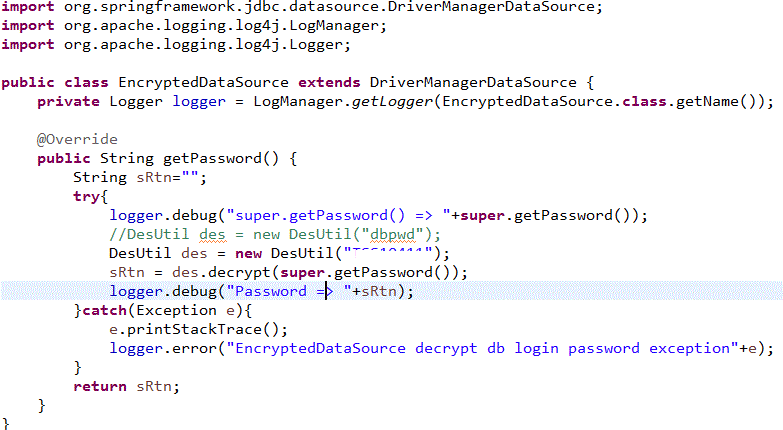
一直不想調這個地方,是因為這個設定為了將DB密碼加密做設定,寫了一個加密的class繼承org.springframework.jdbc.datasource.DriverManagerDataSource,設定如下
<bean id="dataSource" class="com.xxx.util.EncryptedDataSource">
…
後來有找到com.mchange.v2.c3p0.ComboPooledDataSource將DB密碼用成設定的方式
1.applicationContext.xml設定如下
<bean id="dataSource" class="com.mchange.v2.c3p0.ComboPooledDataSource" destroy-method="close">
<property name="driverClass">
<value>com.mysql.jdbc.Driver</value>
</property>
<property name="jdbcUrl" value="jdbc:mysql://127.0.0.1:3306/dbname?characterEncoding=utf-8&autoReconnect=true" />
<property name="acquireIncrement" value="1″/>
<property name="idleConnectionTestPeriod" value="300″/>
<property name="maxPoolSize" value="10″/>
<property name="minPoolSize" value="1″/>
<property name="initialPoolSize" value="1″ />
<property name="numHelperThreads" value="3″/>
<property name="maxIdleTime" value="1200″ />
<property name="acquireRetryAttempts" value="2″/>
<property name="preferredTestQuery" value=" select 1 from dual “/>
<property name="testConnectionOnCheckout" value="true"/>
<property name="testConnectionOnCheckin" value="true"/>
<property name="maxConnectionAge" value="1800″ />
<property name="properties" ref="dataSourceProperties"/>
</bean>
<bean id="dataSourceProperties" class="com.xxx.util.PropertiesEncryptFactoryBean">
<property name="properties">
<props>
<prop key="user">dbuser</prop>
<prop key="password">99d48e6365c86d26d21ea0f0ac1458ef</prop>
</props>
</property>
</bean>
2.PropertiesEncryptFactoryBean的寫法



 葛麗絲的分享世界