1.為了選取自已上傳的圖檔
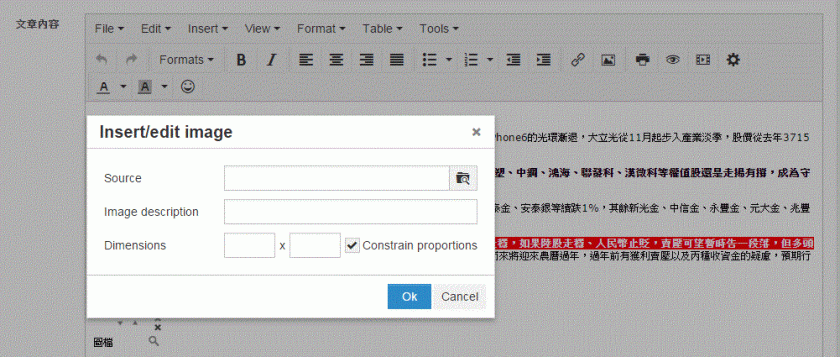

增加如下紅字
tinymce.init({selector: elem,
theme: “modern",
…
file_browser_callback : myFileBrowser,
});
function myFileBrowser (field_name, url, type, win) {
var cmsURL = window.location.toString();
if (cmsURL.indexOf(“?") < 0) {
cmsURL = cmsURL + “?type=" + type;
} else {
cmsURL = cmsURL + “&type=" + type;
}
cmsURL = “WAImage.action?page=9″;
tinyMCE.activeEditor.windowManager.open({
file : cmsURL,
title : ‘請選取上傳圖檔’,
width : $(window).width()-50,
height : $(window).height()-50,
resizable : “yes",
inline : “yes",
close_previous : “no"
}, {
window : win,
input : field_name
});
return false;
}
新開的圖檔選擇頁需新增如下
$(document).ready(function() {
tinyMCEPopup.onInit.add(FileBrowserDialogue.init,FileBrowserDialogue);
});
var FileBrowserDialogue = {
init : function () {
// Here goes your code for setting your custom things onLoad.
},
mySubmit : function () {
// Here goes your code to insert the retrieved URL value into the original dialogue window.
// For example code see below.
}
}
選取完圖檔的回傳方式如下,即可將圖檔連結回傳至Insert/Edit Image對話框內的Source欄位:
var win = tinyMCEPopup.getWindowArg(“window");
win.document.getElementById(tinyMCEPopup.getWindowArg(“input")).value = imgUrl;
if (win.getImageData) win.getImageData();
tinyMCEPopup.close();
2.畫面無法出現編輯頁面(如下圖),而只出現<frameset>原始的樣子

後來發現是因為我用動態的呼叫方式,沒有每次重load網頁,後改成window.location.reload();就OK了
3.取出字串其format不管是raw或html均會出現<html>.<br/>..<head>…<body>,且每次都會在<body>的最前頭加上<p><br/></p>,造成最後顯示會前面愈空愈大
var blogContent = tinyMCE.get(‘blog_content’).getContent({format : ‘raw’});
加上以下紅字
tinymce.init({selector: elem,
…
forced_root_block : false,
force_br_newlines : false,
force_p_newlines : false
});
仍有<html>.<br/>..<head>…<body>,但至少每次<body>最前頭不會加上<p><br/></p>,而<br/>變成\n
故替換掉\n字元
blogContent = blogContent.replace(/(?:\r\n|\r|\n)/g, “);
存入資料庫則只取body內的html
blogContent = parseHTML(blogContent).getElementsByTagName(‘body’)[0].innerHTML;


 葛麗絲的分享世界