1.將www/index.html改為main.html
2.新增新的index.html,內容如下
<!doctype html> <html> <head> <title>tittle</title> window.location=’./main.html’; <body> </body> </html>
調整原因:因為原index.html內容過大造成啟動時異常,故用小的網頁內容取代再連結至原網頁即可修正此問題。
1.將www/index.html改為main.html
2.新增新的index.html,內容如下
<!doctype html> <html> <head> <title>tittle</title> window.location=’./main.html’; <body> </body> </html>
調整原因:因為原index.html內容過大造成啟動時異常,故用小的網頁內容取代再連結至原網頁即可修正此問題。

cordova build android出現如下錯誤訊息

在專案的以下兩個檔案內
/platforms/build.gradle
/platforms/CordovaLib/build.gradle
將此行
mavenCentral()
全部替換成
maven {
    url "http://repo1.maven.org/maven2"
}
因https執行有問題,故改為http執行

1.登入google developer console
https://console.developers.google.com
2.點選API管理員

3.申請憑證:點選"Create credentials" Button
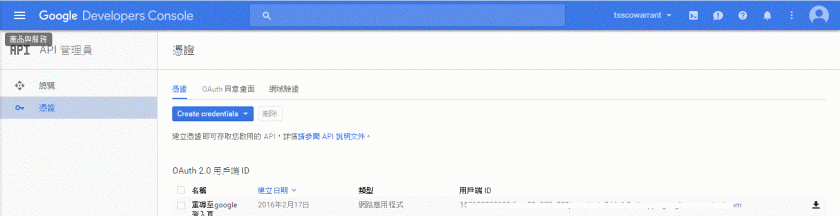
選擇OAuth用戶端ID
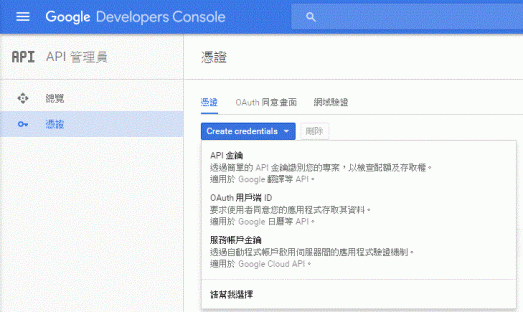
應用程式類型:請選"網路應用程式"
名稱:請輸入用戶可辨認名稱
已授權的重新導向URI:請輸入授權後欲連至那個網頁做後續資料存取
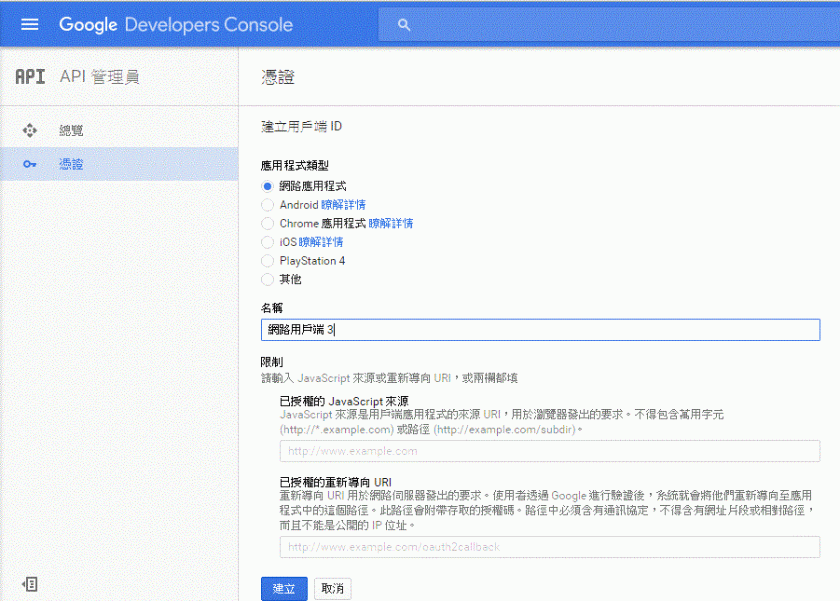
按"建立"Button後即可至第一頁下載憑證,憑證內容為json格式,如下
{“web":{“client_id":"…","project_id":"…","auth_uri":"https://accounts.google.com/o/oauth2/auth","token_uri":"https://accounts.google.com/o/oauth2/token","auth_provider_x509_cert_url":"https://www.googleapis.com/oauth2/v1/certs","client_secret":"…","redirect_uris":[“http://localhost/warrantweb/Auth_google.action"]}}

試了server端的java,一直卡在呼叫google ssl憑證失效的問題,還未找到google java api要如何調整,因此先調成javascript呼叫,試出來的流程
1.登入:連結此段
document.location.href = “https://accounts.google.com/o/oauth2/auth?response_type=token&client_id={ 向google申請的client id }&redirect_uri={ 向google申請欲導向的網頁url }&scope=https%3A%2F%2Fwww.googleapis.com%2Fauth%2Fuserinfo.profile+https%3A%2F%2Fwww.googleapis.com%2Fauth%2Fuserinfo.email";
response_type原本是傳code,會在google認證完後將資料傳到設定欲導向的網頁url,並在url後帶參數code (Ex. {url}?code=……),此段一直在研究如何透過此code再向google取得access token,後來發現只要將此參數帶入token值,即會直接回傳access token,且若已登入按過允許此應用程式存取,則不用再登入,而直接連至欲導向的網頁url,並將access token帶至hash (Ex. {url}#code=…..)
2.存取客戶留存在google的資料
javascript 如下
function getPageParam(paramid) {
	var rName = new RegExp("(\\?(.*))?$");
	var getcatch = document.location.hash.replace('#','');
	var t = getcatch.match(/([^&=]+)=([^=&]+)/g);
	for (var l = 0; l < t.length; l++){
       	       	var r = t[l];
		var tt = r.match(/([^&=]+)=([^=&]+)/);
		if (tt && tt[1]==paramid)
			return tt[2];
    }
}

function validateToken() {
    $.ajax({
        url: 'https://www.googleapis.com/oauth2/v1/tokeninfo?access_token=' + getPageParam("access_token"),
        data: null,
        success: function(response){
            getUserInfo();
        },
        error: function(error) {
            console.log('Our token is not valid....');
        },
        dataType: "jsonp"
    });
}

function getUserInfo() {
    $.ajax({
        url: 'https://www.googleapis.com/oauth2/v1/userinfo?access_token=' + getPageParam("access_token"),
        data: null,
        success: function(response) {
            $('#user').html(response.name);
        },
        dataType: "jsonp"
    });
}

validateToken();



 葛麗絲的分享世界