1.登入google developer console
https://console.developers.google.com
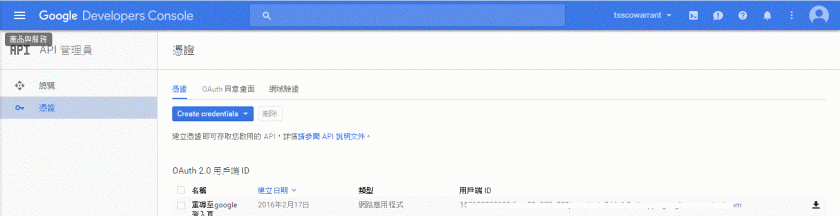
2.點選API管理員

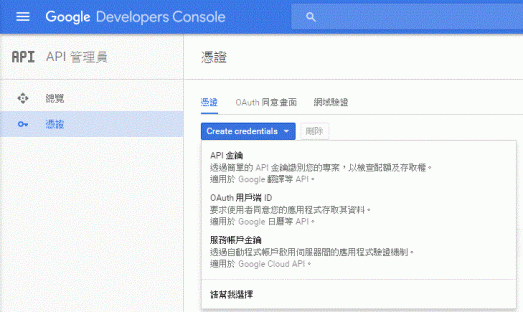
3.申請憑證:點選"Create credentials" Button
選擇OAuth用戶端ID
應用程式類型:請選"網路應用程式"
名稱:請輸入用戶可辨認名稱
已授權的重新導向URI:請輸入授權後欲連至那個網頁做後續資料存取
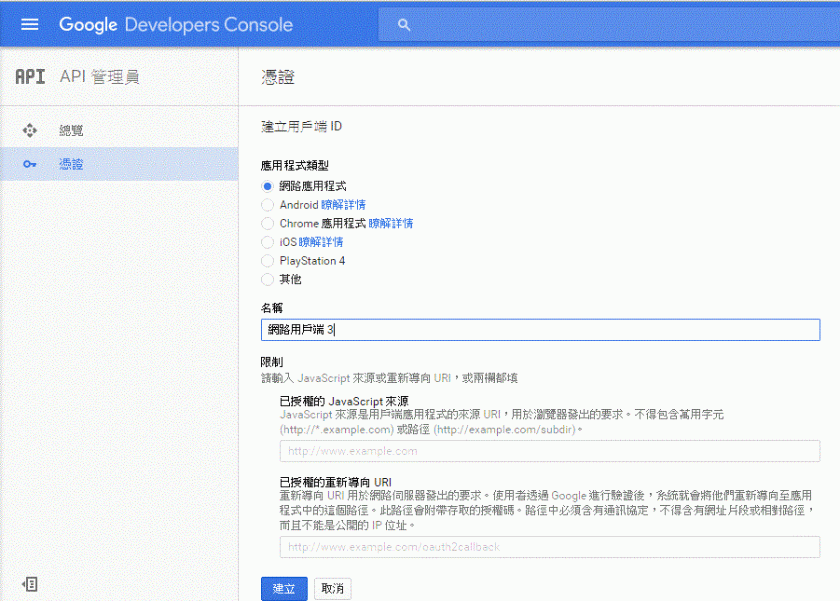
按"建立"Button後即可至第一頁下載憑證,憑證內容為json格式,如下
{“web":{“client_id":"…","project_id":"…","auth_uri":"https://accounts.google.com/o/oauth2/auth","token_uri":"https://accounts.google.com/o/oauth2/token","auth_provider_x509_cert_url":"https://www.googleapis.com/oauth2/v1/certs","client_secret":"…","redirect_uris":[“http://localhost/warrantweb/Auth_google.action"]}}


 葛麗絲的分享世界