使用xdocreport套件:https://github.com/opensagres/xdocreport
1.word / Ctrl + F9 => 編輯功能變數 => 設定"Merge Field",欄位名稱請加$


2.程式碼
import java.awt.Color;
import java.io.File;
import java.io.FileInputStream;
import java.io.FileOutputStream;
import java.io.IOException;
import java.io.InputStream;
import java.io.OutputStream;
import org.apache.poi.xwpf.converter.pdf.PdfOptions;
import com.lowagie.text.Document;
import com.lowagie.text.DocumentException;
import com.lowagie.text.Font;
import com.lowagie.text.pdf.BaseFont;
import com.lowagie.text.pdf.PdfCopy;
import com.lowagie.text.pdf.PdfReader;
import com.lowagie.text.pdf.PdfWriter;
import fr.opensagres.xdocreport.converter.ConverterTypeTo;
import fr.opensagres.xdocreport.converter.ConverterTypeVia;
import fr.opensagres.xdocreport.converter.Options;
import fr.opensagres.xdocreport.core.XDocReportException;
import fr.opensagres.xdocreport.document.IXDocReport;
import fr.opensagres.xdocreport.document.registry.XDocReportRegistry;
import fr.opensagres.xdocreport.itext.extension.font.ITextFontRegistry;
import fr.opensagres.xdocreport.samples.docxandvelocity.model.Project;
import fr.opensagres.xdocreport.template.IContext;
import fr.opensagres.xdocreport.template.TemplateEngineKind;

public class Convert2PDF {
    public static void main(String[] args) throws DocumentException {
        try {
              InputStream in = new FileInputStream(new File("A.docx"));
              IXDocReport report = XDocReportRegistry.getRegistry().loadReport(in, TemplateEngineKind.Velocity);
              IContext context = report.createContext();
              Project project = new Project("測試XDocReport");
              context.put("project", project);
              //功能變數替換
              context.put("fieldName1", "-1.FieldFirst中文");
              context.put("titleName2", "-2.中文MergeTitleTwo");
              context.put("parameter1", "-3.row1,value3");
              context.put("parameter2", "-4.row2,value1");
              context.put("parameter3", "-5.red,row3,value2");

              OutputStream out = new FileOutputStream(new File("A_Out.pdf"));
              PdfOptions pdfOptions = PdfOptions.create();
              pdfOptions.fontProvider( new ITextFontRegistry()
              {
                  public Font getFont( String familyName, String encoding, float size, int style, Color color )
                  {
                      try
                      {
                          BaseFont bfChinese =
                              BaseFont.createFont( "font/kaiu.ttf", BaseFont.IDENTITY_H, BaseFont.EMBEDDED );
                          Font fontChinese = new Font( bfChinese, size, style, color );
                          if ( familyName != null )
                              fontChinese.setFamily( familyName );
                          return fontChinese;
                      }
                      catch ( Throwable e )
                      {
                          e.printStackTrace();
                          // An error occurs, use the default font provider.
                          return ITextFontRegistry.getRegistry().getFont( familyName, encoding, size, style, color );
                      }
                  }

              } );

              Options options = Options.getTo(ConverterTypeTo.PDF).via(ConverterTypeVia.XWPF).subOptions(pdfOptions);
              report.convert(context, options, out);

              //加密
              Document pdfDocument = new Document();
              PdfCopy pdfCopy = new PdfCopy(pdfDocument, new FileOutputStream("A_Out2.pdf"));
              String pwd = "testpwd";
              pdfCopy.setEncryption(pwd.getBytes(), pwd.getBytes(), 0,
                        PdfWriter.ENCRYPTION_AES_128);

              PdfReader pdfReader = new PdfReader("A_Out.pdf");
              int numberPage = pdfReader.getNumberOfPages();
              pdfDocument.open();
              for (int iPage = 1; iPage <= numberPage; iPage++) {
                  pdfCopy.addPage(pdfCopy.getImportedPage(pdfReader, iPage));
              }
              pdfDocument.close();
         } catch (IOException e) {
             e.printStackTrace();
         } catch (XDocReportException e) {
             e.printStackTrace();
         }
    }
}
3.執行後結果:開啟"A_Out2.pdf"
1) 顯示輸入密碼
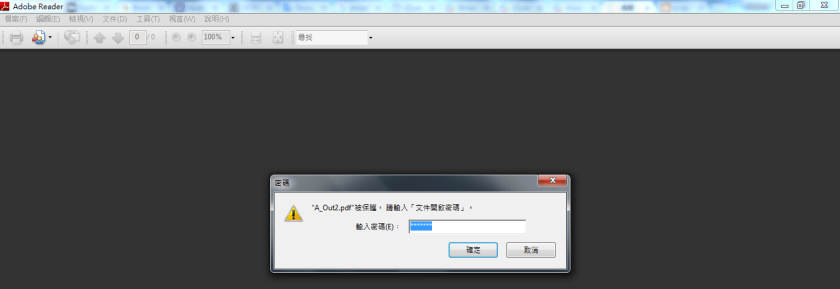
2) 顯示內容

補充:pdf檔案加密,需於執行此程式時,請下載 bcprov-jdk16-146.jar (http://www.java2s.com/Code/Jar/b/Downloadbcprovjdk16146jar.htm),
執行時classpath加上bcprov-jdk16-146.jar
補充說明:我使用的xdocReport是使用iText2,原本是要用iText7開發套表成pdf檔,但需購買pdf writer,且iText7/iText5應該需要購買商業版權,關於iText license說明如下-https://zh.wikipedia.org/wiki/IText說明請參考:
iTextSharp 4.1.6/iText 4.2.0之前的版本是在MPL和LGPL許可證下分發的,
允許用戶在閉源軟體專案中使用。
2009年底,iText第5版發布,其許可證被更換為Affero通用公共許可證第3版。
那些不願意提供其原始碼的專案,可以購買iText第5版的商業許可,
或沒有任何變化的繼續使用iText的以前版本(其許可證更寬鬆)。
然而,開發商Bruno Lowagie警告說,
第5版之前的版本可能包含非LGPL授權的代碼,
因而以前版本的閉源專案的用戶可能需要為侵犯版權負責。
雖然AGPL庫可以連結到GPL的程式,但AGPL許可證與GPL許可證不相容。


 葛麗絲的分享世界