發表於 程式分享

如何透過jersey client 實體化接收到的restful json為java class

1.java class是透過maven pom.xml以下設定,由.xsd檔產生java class檔
1) pom.xml片段
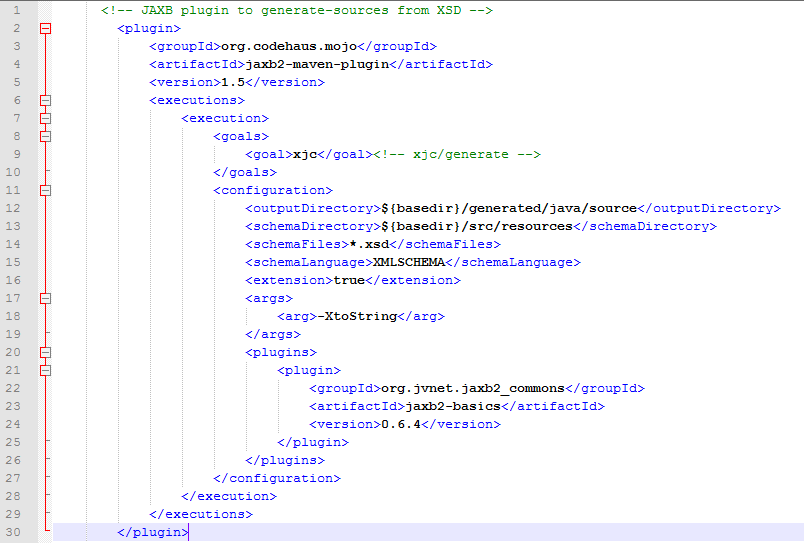
1.PNG

2) xsd檔片段

1

2.PNG

3) 產生的java class

package com.xxx.xsd.openacct;

import java.util.ArrayList;
import java.util.List;
import javax.xml.bind.annotation.XmlAccessType;
import javax.xml.bind.annotation.XmlAccessorType;
import javax.xml.bind.annotation.XmlElement;
import javax.xml.bind.annotation.XmlRootElement;
import javax.xml.bind.annotation.XmlType;

@XmlAccessorType(XmlAccessType.FIELD)
@XmlType(name = "", propOrder = {
"registerId",
"openAcct",
"drClientType",
"drtClientType",
"ctClientApplyType"
})
@XmlRootElement(name = "ClientListType")
public class ClientListType {
  @XmlElement(required = true)
  protected String registerId;
  protected boolean openAcct;
  @XmlElement(name = "DRClientType")
  protected List drClientType;
  @XmlElement(name = "DRTClientType")
  protected List drtClientType;
  @XmlElement(name = "CTClientApplyType")
  protected CTClientApplyType ctClientApplyType;

  public String getRegisterId() {
    return registerId;
  }

  public void setRegisterId(String value) {
    this.registerId = value;
  }

  public boolean isOpenAcct() {
    return openAcct;
  }

  public void setOpenAcct(boolean value) {
    this.openAcct = value;
  }

  public List getDRClientType() {
    if (drClientType == null) {
      drClientType = new ArrayList();
    }
    return this.drClientType;
  }

  public List getDRTClientType() {
    if (drtClientType == null) {
      drtClientType = new ArrayList();
    }
    return this.drtClientType;
  }

  public CTClientApplyType getCTClientApplyType() {
    return ctClientApplyType;
  }

  public void setCTClientApplyType(CTClientApplyType value) {
    this.ctClientApplyType = value;
  }
}

2.client接收的第一種作法是取得json字串再轉成json Object

  StringBuffer stringBuffer = new StringBuffer();
        BufferedReader bufferedReader = null;
        InputStreamReader inputStreamReader = null;
        String readSingleLine = null;
        try {
            URL url = new URL("http://127.0.0.1/restOnline/services/clientservice/getclient/123456789");
            HttpURLConnection connection = (HttpURLConnection) url.openConnection();
            connection.setRequestMethod("GET");
            connection.setRequestProperty("Content-Type", "application/json");
            connection.setRequestProperty("Accept", "application/json");
            connection.setDoOutput(true);
            connection.setConnectTimeout(5000);
            connection.setReadTimeout(5000);
 
            inputStreamReader = new InputStreamReader(connection.getInputStream());
            bufferedReader = new BufferedReader(inputStreamReader);
     
            while ((readSingleLine = bufferedReader.readLine()) != null) {
                stringBuffer.append(readSingleLine);
            }
            inputStreamReader.close();
            
            logger.info("stringBuffer: " + stringBuffer);
            JSONObject jsonObject = new JSONObject(stringBuffer.toString());
            logger.info("jsonObject-registerId: " + jsonObject.getString("registerId"));
            logger.info("jsonObject: " + jsonObject);
        } catch (Exception e) {
            logger.error(e);
            return false;
        } finally {
            try {
                if (inputStreamReader != null)
                    inputStreamReader.close();
            } catch (IOException e) {
                logger.error(e);
            }
        }       

3.client接收的第二種作法HTTP GET是取得json字串直接實體化為server的java object

   import java.io.BufferedReader;
    import java.io.IOException;
    import java.io.InputStreamReader;
    import java.net.HttpURLConnection;
    import java.net.URL;
    import javax.ws.rs.client.Client;
    import javax.ws.rs.client.ClientBuilder;
    import javax.ws.rs.client.Invocation;
    import javax.ws.rs.client.WebTarget;
    import javax.ws.rs.core.GenericType;
    import org.glassfish.jersey.client.ClientConfig;
    import org.glassfish.jersey.jackson.JacksonFeature;
    import org.json.JSONObject;
    import com.opensymphony.xwork2.Action;
    import com.xxx.xsd.openacct.ClientListType;
    
    ...
    ...
    
    private boolean getDRClientStatus2() {
        ClientConfig clientConfig = new ClientConfig();
        clientConfig.register(JacksonFeature.class);
        
        Client client = ClientBuilder.newClient();
        WebTarget webTarget = client.target("http://127.0.0.1/restOnline/services/clientservice/getclient/123456789");
        Invocation.Builder invocation = webTarget.request();
        GenericType genericType = new GenericType() {};
        ClientListType clientListType = invocation.get(genericType);
        
        logger.info("clientListType.registerId: " + clientListType.getRegisterId());
        return true;
    }

這個地方花了些時間找jersey client相關的套件,我使用的jar套件整理如下:

1.PNG

4.client接收的第二種作法HTTP POST是取得json字串直接實體化為server的java object

 
import java.io.BufferedReader;
import java.io.IOException;
import java.io.InputStreamReader;
import java.net.HttpURLConnection;
import java.net.URL;
import javax.ws.rs.client.Client;
import javax.ws.rs.client.ClientBuilder;
import javax.ws.rs.client.Entity;
import javax.ws.rs.client.Invocation;
import javax.ws.rs.client.WebTarget;
import javax.ws.rs.core.GenericType;
import javax.ws.rs.core.MediaType;
import org.glassfish.jersey.client.ClientConfig;
import org.glassfish.jersey.jackson.JacksonFeature;
import org.json.JSONObject;
import com.opensymphony.xwork2.Action;
import com.xxx.xsd.openacct.ClientListType;
import com.xxx.xsd.openacct.ClientQryType;
...
...
    private boolean getDRClientStatus3() {
    ClientConfig clientConfig = new ClientConfig();
    clientConfig.register(JacksonFeature.class);
        
    Client client = ClientBuilder.newClient();
    WebTarget target = client.target("http://127.0.0.1/restOnline/services/clientservice/getclientInfo"); 
    ClientQryType clientQryType = new ClientQryType();
    clientQryType.setKind(1);
    clientQryType.setRegisterId("A223982142");
        
    Invocation invocation = target.request().buildPost(Entity.entity(clientQryType, MediaType.APPLICATION_JSON_TYPE));
    GenericType genericType = new GenericType() {};
    ClientListType clientListType = invocation.invoke(genericType);
        
    logger.info("clientListType.registerId: " + clientListType.getRegisterId());  

新增的jar套件如下:

1.PNG

發表於 程式分享

Swift語法學習筆記

//
//  main.swift
//  HelloSwift
//
//  Created by grace on 2017/5/21.
//  Copyright © 2017年 grace. All rights reserved.
//

import Foundation

func func1()
{
    //1.print
    print("Hello, World!")
    
    //2.calculate
    let a = 25
    var b:Int = 3
    print(a+b)
    b += 1
    print(a+b)
    
    let doubleVal:Double = 111.11
    var varDoubleVal:Double = 22.22
    varDoubleVal += 1.1
    
    let intVal:Int = 22
    var varIntVal:Int = 21
    varIntVal += 2
    
    var sum = 0
    sum = intVal + varIntVal
    print("The sum-1 is " + String(sum))
    print("The sum-2 is \(sum)")
    print("The sum-3 is \(intVal + varIntVal)")


    var sumDouble:Double = 0.0
    sumDouble = doubleVal + varDoubleVal
    print("The sumDouble-1 is " + String(sumDouble))
    print("The sumDouble-2 is \(sumDouble)")
    print("The sumDouble-3 is \(doubleVal + varDoubleVal)")

    //3.Array
    var numbers:Array = [15, 25]
    print("numbers sum is \(numbers[0] + numbers[1])")

    //4.Dictionary
    var numberDic:Dictionary = [
        "grace": 40,
        "kevin": 42
    ]

    print((numberDic["grace"]!))
    print("grace's age is \(numberDic["grace"]!)")
    print("kevin's age is \(numberDic["kevin"])")

    //5.for
    for i in 1...10 {
        print(i)
    }

    var gradesDic = [
        "May" : 99,
        "Bob" : 59,
        "Joe" : 56
    ]

    //6.for and Dictionary
    for grade in gradesDic
    {
        if grade.1 < 60 {             print("\(grade.0)'s grade is \(grade.1)")         }     }     print((gradesDic["May"]!))     print("May's grade is \(gradesDic["May"]!)") } //7.call function with no parameter and no return func1() //8.function with return String func greet()->String {
    return "Hello"
}

var helloString = greet()
print(helloString)

//9.function with 2 input parameters
func greet2(var1:String, var2:String)->String {
    return "Hello,\(var1) and \(var2)"
}

var helloString2 = greet2(var1: "Grace", var2: "Kevin")
print(helloString2)

//10.function with return array
func getGrades()->(grade1:UInt32, grade2:UInt32, grade3:UInt32) {
    return (arc4random() % 100 + 1, arc4random() % 100 + 1, arc4random() % 100 + 1)
}

var returnArray = getGrades()
print("\(returnArray.grade1),\(returnArray.grade2),\(returnArray.grade3)")

//11.function with not quantitative parameters(不定量變數)
func sumOf(numbers:Int...)->Int {
    var sum:Int = 0
    for number in numbers {
        sum += number
    }
    
    return sum
}

print(sumOf(numbers: 1,2,3,4,5))

//12.class
class Shape {
    var name:String
    var slides:Int
    
    init(name:String, slides:Int) {
        self.name = name
        self.slides = slides
    }
    
    func simpleDescription() ->String {
        return "name is \(self.name), slides is \(self.slides)"
    }
}

var shape1:Shape = Shape(name: "shape1", slides: 4)
print(shape1.simpleDescription())

//13.inherit
class Square : Shape {
    var slideLength:Double
    
    init(name:String, sideLength:Double) {
        self.slideLength = sideLength
        super.init(name: name, slides: 4)
    }
    
    func area()->Double {
        return slideLength * slideLength
    }
    
    override func simpleDescription() -> String {
        return "A square of sideLength \(self.slideLength) which name is \(self.name), slides is \(self.slides)"
    }
}

var square1:Square = Square(name: "square1", sideLength: 5.5)
print("\(square1.name)'s area is \(square1.area()), and description is \(square1.simpleDescription()).")
發表於 程式分享

fineupload整批上傳成base64檔案

一、實作功能為: 因需將每個檔案於browser端簽章,並於server端驗章,
且需多個檔案同時上傳以取得同一批次序號

二、使用工具:
1.jquery套件fine uploader : 下載的url為https://fineuploader.com/
有API文件可參考.
2.struts2
3.Tomcat

三、基本的程式
1.browser端請直接參考https://fineuploader.com/demos.html
2.server端即為endpoint的連結

   $('#bootstrapped-fine-uploader').fineUploader({
        template: 'qq-template-bootstrap',
        request: {
            endpoint: '/server/uploads'
        }
    });

1) qqfile為傳入的檔案,型態為File,
取得檔案內容為byte[]方式如下,
我將byte[]存入MySQL資料庫mediumblob型態的欄位

   if (qqfile != null && allowedFileTypes.indexOf(sExtension.toLowerCase()) >= 0) {
        try {
            fis = new FileInputStream(qqfile);
            byte[] bFile = new byte[(int) qqfile.length()];
            fis.read(bFile);
        } catch (FileNotFoundException e) {
            logger.error(e.getStackTrace());
            message = e.getMessage();
        } catch (IOException e) {
            logger.error(e.getStackTrace());
            message = e.getMessage();
        } finally {
            try {
                if (fis != null) {
                    fis.close();
                }
            } catch (IOException e) {
                logger.error(e.getStackTrace());
            }
        }
    }

2) qqfileFileName為傳入的檔案名稱,型態為String

四、遇到的問題及解法
1.於fine uploader 如何設定不自動上傳檔案?

    $('#bootstrapped-fine-uploader').fineUploader({
        template: 'qq-template-bootstrap',
        autoUpload: false, //client端改為false,不需先上傳
        ...
    });

2.fine uploader如何不將檔案上傳至server端即顯示檔案大小?

   $('#bootstrapped-fine-uploader').fineUploader({
        ...
        callbacks: {
            ...
            onSubmitted: function(id, name) {
                var file = this.getItemByFileId(id);
                //thumbnail為file template內某個class為qq-thumbnail-selector的element
                var thumbnail = $(file).find('.qq-thumbnail-selector');                    
                //檔名
                $(thumbnail).attr('docFileName', name);                    
                //檔案大小
                var uploadSize = $(file).find('.qq-upload-size-selector');                    
                    $(uploadSize).html(formatSize(this.getSize(id)));
            },
            ...
        },
        ...
    });
    
    function formatSize(bytes){
        var sizeSymbols = ["kB", "MB", "GB", "TB", "PB", "EB"];
        var i = -1;
        do {
            bytes = bytes / 1000;
            i++;
        } while (bytes > 999);

        return Math.max(bytes, 0.1).toFixed(1) + sizeSymbols[i];
    }

3.fine uploader顯示的內容如何不顯示縮圖,即其圖檔的顯示以原圖大小顯示?

   $('#bootstrapped-fine-uploader').fineUploader({
        ...
        callbacks: {
            ...
            onSubmitted: function(id, name) {
                var file = this.getItemByFileId(id);
                //thumbnail為file template內某個class為qq-thumbnail-selector的element
                var thumbnail = $(file).find('.qq-thumbnail-selector');
                                    
                var blob = $('#bootstrapped-fine-uploader').fineUploader('getFile', id);
                var reader = new window.FileReader();
                reader.readAsDataURL(blob); 
                reader.onloadend = function() {
                    var base64data = reader.result;
                    //將src設為檔案的base64格式,若thumbnail為img,則直接顯示圖檔於browser端
                    $(thumbnail).attr('src', base64data);
                }
                ...
            },
            ...
        },
        ...
    });

4.批次上傳檔案超過HTTP POST Limit size,如何調整Tomcat限制使其可上傳成功? (此問題是以某個變數為null呈現,其根本原因是超過HTTP POST Limit size)
於server.xml / Connector element內port="8080″內加上maxPostSize="20971520″
其中20971520 (= 20 * 1024 * 1024),即20MB,可自行調整

5.base64字串如何存入MySQL blobimage欄位?
將傳入的base64字串(String)轉成byte[]存入資料庫,Ex.base64Str.getBytes()

6.圖檔如何直接呈現於brower?
以我使用的struts套件說明如何回傳給browser端說明
1) struts.xml
<action …>

<result name$eq;"{1}" type$eq;"json">
<param name$eq;"root">dataMap</param>
</result>
</action>

2) server直接用dataMap.put將資料庫blobimage欄位取出為byte[]格式,
並回傳browser端為json格式,此json資料為int array

   private Map dataMap = new LinkedHashMap();
    ...
    //binaryStr為由MySQL blobimage欄位取得,為byte[]格式
    dataMap.put("binaryStr", binaryStr);

3) browser取得json int array的處理方式如下
myData.binarytoString(json資料為int array)取得img element src attr的內容,
即可呈現於browser端圖檔

   function binarytoString(array) {
        var result = "";
        for (var i = 0; i < array.length; i++) {
            //result += String.fromCharCode(parseInt(array[i], 2));
            result += String.fromCharCode(array[i]);
        }
        return result;
    }

7.如何將取出存成檔案於brower下載 (檔案有可能是圖檔、pdf、excel、word…) ?

   import java.io.FileOutputStream;
    import java.io.IOException;
    import java.io.OutputStream;
    import javax.xml.bind.DatatypeConverter;
    ...

    public class ShowFileAction extends BaseAction {
        private int seqno;
        
        public ShowFileAction() {
            super();
        }

        public int getSeqno() {
            return seqno;
        }
        
        public void setSeqno(int seqno) {
            this.seqno = seqno;
        }

        @Override
        public String execute() throws Exception {
            if (seqno <= 0) {
                logger.error("No Docment match");
                response.getWriter().println("No Docment match");
                return NONE;
            }
            
            //由資料庫取得base64 string,格式為byte[]
            String docType = null;
            byte[] docSrc = null;
            ...
            
            if (docSrc != null) {
                byte[] decodeBytes = docSrc;
                String base64Str = new String(docSrc);
                //截取base64Str內,以後的資料,,之前的為檔案格式內容,非檔案資料
                String tmpBase64Str = base64Str.substring(base64Str.indexOf(",") + 1);
                decodeBytes = DatatypeConverter.parseBase64Binary(tmpBase64Str);

                FileOutputStream fos = null;
                try {
                    //2.顯示檔案                
                    String docFileName = java.net.URLEncoder.encode(fileName, "UTF-8");
                    response.setHeader("Content-Disposition", "attachment;filename=".concat(docFileName));
                    response.setContentType(getContentType(docType));
                    OutputStream out = response.getOutputStream();
                    out.write(decodeBytes);
                    out.close();            
                } catch (IOException e) {
                    logger.error("seqno: " + seqno + " -- " + e.getMessage());
                    response.getWriter().println("Get Docment error");
                } finally {
                    if (fos != null)
                        fos.close();
                }   
                    
            } else {
                logger.error("No Docment - seqno: " + seqno);
                response.getWriter().println("No Docment");
            }
                
            return NONE;
        } 
        
        /**
         * 取得content Type
         * @param docType
         * @return
         */
        private static String getContentType(String docType) {
            if (docType.compareToIgnoreCase("doc") == 0 || docType.compareToIgnoreCase("docx") == 0)
                return "application/vnd.ms-word";
            else if (docType.compareToIgnoreCase("xls") == 0 || docType.compareToIgnoreCase("xlsx") == 0 ||
                    docType.compareToIgnoreCase("csv") == 0)
                return "application/vnd.ms-excel";
            else if (docType.compareToIgnoreCase("pdf") == 0)
                return "application/pdf";
            else if (docType.compareToIgnoreCase("txt") == 0)
                return "text/plain";
            else if (docType.compareToIgnoreCase("jpg") == 0 || docType.compareToIgnoreCase("jpeg") == 0)
                return "image/jpeg";
            else if (docType.compareToIgnoreCase("png") == 0)
                return "image/png";
            else if (docType.compareToIgnoreCase("gif") == 0)
                return "image/gif";
            return "application/vnd.ms-word";
        }   
    }

8.圖檔縮圖及放大呈現?
用javascript (jquery)處理

   $(document).ready(function() {
        //click 第4項產生的小圖(其設定的width較小)時觸發
        //小圖的class為sealImg
        //需注意若小圖是用javascript動態產生,需於小圖產生後再重bind此行,否則不work
        $('.sealImg').bind('click', showImgFunc);
    }); 
    
    function showImgFunc(e) {        
        e.preventDefault();
        
        var imgSrc = $(this).attr('src');        
        var htmlSrc = '';
        
        //modal是用bootstrap3產生,此處不說明
        $('#modal-body-image').html(htmlSrc);
        $('#imageModal').on('shown.bs.modal', function(e) {
                $("#messageBtn").focus();
        });  
        $('#imageModal').modal('show');
    }