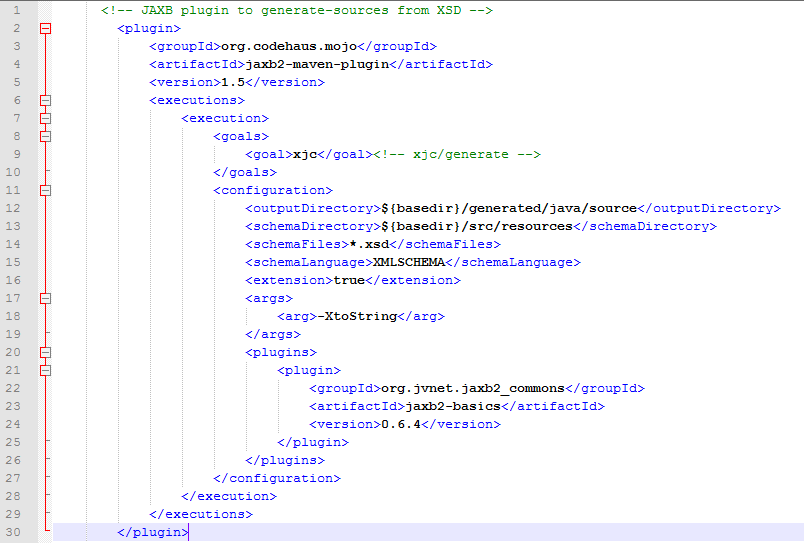
1.java class是透過maven pom.xml以下設定,由.xsd檔產生java class檔
1) pom.xml片段
2) xsd檔片段


3) 產生的java class
package com.xxx.xsd.openacct;

import java.util.ArrayList;
import java.util.List;
import javax.xml.bind.annotation.XmlAccessType;
import javax.xml.bind.annotation.XmlAccessorType;
import javax.xml.bind.annotation.XmlElement;
import javax.xml.bind.annotation.XmlRootElement;
import javax.xml.bind.annotation.XmlType;

@XmlAccessorType(XmlAccessType.FIELD)
@XmlType(name = "", propOrder = {
"registerId",
"openAcct",
"drClientType",
"drtClientType",
"ctClientApplyType"
})
@XmlRootElement(name = "ClientListType")
public class ClientListType {
  @XmlElement(required = true)
  protected String registerId;
  protected boolean openAcct;
  @XmlElement(name = "DRClientType")
  protected List drClientType;
  @XmlElement(name = "DRTClientType")
  protected List drtClientType;
  @XmlElement(name = "CTClientApplyType")
  protected CTClientApplyType ctClientApplyType;

  public String getRegisterId() {
    return registerId;
  }

  public void setRegisterId(String value) {
    this.registerId = value;
  }

  public boolean isOpenAcct() {
    return openAcct;
  }

  public void setOpenAcct(boolean value) {
    this.openAcct = value;
  }

  public List getDRClientType() {
    if (drClientType == null) {
      drClientType = new ArrayList();
    }
    return this.drClientType;
  }

  public List getDRTClientType() {
    if (drtClientType == null) {
      drtClientType = new ArrayList();
    }
    return this.drtClientType;
  }

  public CTClientApplyType getCTClientApplyType() {
    return ctClientApplyType;
  }

  public void setCTClientApplyType(CTClientApplyType value) {
    this.ctClientApplyType = value;
  }
}
2.client接收的第一種作法是取得json字串再轉成json Object
  StringBuffer stringBuffer = new StringBuffer();
        BufferedReader bufferedReader = null;
        InputStreamReader inputStreamReader = null;
        String readSingleLine = null;
        try {
            URL url = new URL("http://127.0.0.1/restOnline/services/clientservice/getclient/123456789");
            HttpURLConnection connection = (HttpURLConnection) url.openConnection();
            connection.setRequestMethod("GET");
            connection.setRequestProperty("Content-Type", "application/json");
            connection.setRequestProperty("Accept", "application/json");
            connection.setDoOutput(true);
            connection.setConnectTimeout(5000);
            connection.setReadTimeout(5000);

            inputStreamReader = new InputStreamReader(connection.getInputStream());
            bufferedReader = new BufferedReader(inputStreamReader);

            while ((readSingleLine = bufferedReader.readLine()) != null) {
                stringBuffer.append(readSingleLine);
            }
            inputStreamReader.close();

            logger.info("stringBuffer: " + stringBuffer);
            JSONObject jsonObject = new JSONObject(stringBuffer.toString());
            logger.info("jsonObject-registerId: " + jsonObject.getString("registerId"));
            logger.info("jsonObject: " + jsonObject);
        } catch (Exception e) {
            logger.error(e);
            return false;
        } finally {
            try {
                if (inputStreamReader != null)
                    inputStreamReader.close();
            } catch (IOException e) {
                logger.error(e);
            }
        }
3.client接收的第二種作法HTTP GET是取得json字串直接實體化為server的java object
   import java.io.BufferedReader;
    import java.io.IOException;
    import java.io.InputStreamReader;
    import java.net.HttpURLConnection;
    import java.net.URL;
    import javax.ws.rs.client.Client;
    import javax.ws.rs.client.ClientBuilder;
    import javax.ws.rs.client.Invocation;
    import javax.ws.rs.client.WebTarget;
    import javax.ws.rs.core.GenericType;
    import org.glassfish.jersey.client.ClientConfig;
    import org.glassfish.jersey.jackson.JacksonFeature;
    import org.json.JSONObject;
    import com.opensymphony.xwork2.Action;
    import com.xxx.xsd.openacct.ClientListType;

    ...
    ...

    private boolean getDRClientStatus2() {
        ClientConfig clientConfig = new ClientConfig();
        clientConfig.register(JacksonFeature.class);

        Client client = ClientBuilder.newClient();
        WebTarget webTarget = client.target("http://127.0.0.1/restOnline/services/clientservice/getclient/123456789");
        Invocation.Builder invocation = webTarget.request();
        GenericType genericType = new GenericType() {};
        ClientListType clientListType = invocation.get(genericType);

        logger.info("clientListType.registerId: " + clientListType.getRegisterId());
        return true;
    }
這個地方花了些時間找jersey client相關的套件,我使用的jar套件整理如下:

4.client接收的第二種作法HTTP POST是取得json字串直接實體化為server的java object
import java.io.BufferedReader;
import java.io.IOException;
import java.io.InputStreamReader;
import java.net.HttpURLConnection;
import java.net.URL;
import javax.ws.rs.client.Client;
import javax.ws.rs.client.ClientBuilder;
import javax.ws.rs.client.Entity;
import javax.ws.rs.client.Invocation;
import javax.ws.rs.client.WebTarget;
import javax.ws.rs.core.GenericType;
import javax.ws.rs.core.MediaType;
import org.glassfish.jersey.client.ClientConfig;
import org.glassfish.jersey.jackson.JacksonFeature;
import org.json.JSONObject;
import com.opensymphony.xwork2.Action;
import com.xxx.xsd.openacct.ClientListType;
import com.xxx.xsd.openacct.ClientQryType;
...
...
    private boolean getDRClientStatus3() {
    ClientConfig clientConfig = new ClientConfig();
    clientConfig.register(JacksonFeature.class);

    Client client = ClientBuilder.newClient();
    WebTarget target = client.target("http://127.0.0.1/restOnline/services/clientservice/getclientInfo");
    ClientQryType clientQryType = new ClientQryType();
    clientQryType.setKind(1);
    clientQryType.setRegisterId("A223982142");

    Invocation invocation = target.request().buildPost(Entity.entity(clientQryType, MediaType.APPLICATION_JSON_TYPE));
    GenericType genericType = new GenericType() {};
    ClientListType clientListType = invocation.invoke(genericType);

    logger.info("clientListType.registerId: " + clientListType.getRegisterId());
新增的jar套件如下:


 葛麗絲的分享世界