自架 Harbor Registry,並設定為k8s image來源,相關步驟如下
1.安裝docker-compose
sudo apt install docker-compose
2.安裝harbor
wget https://github.com/goharbor/harbor/releases/download/v2.2.3/harbor-offline-installer-v2.2.3.tgz
tar xvf harbor-offline-installer-v2.2.3.tgz
3.安裝harbor在docker上
1) 建路徑
mkdir -p /docker_data
mv harbor /docker_data
cd /docker_data/harbor
tree .
2) 設定安裝檔
cp harbor.yml.tmpl harbor.yml
vi harbor.yml
# The IP address or hostname to access admin UI and registry service.
# DO NOT use localhost or 127.0.0.1, because Harbor needs to be accessed by external clients.
hostname: 192.168.56.3
# http related config
http:
# port for http, default is 80. If https enabled, this port will redirect to https port
port: 81
# https related config
#https:
# https port for harbor, default is 443
#port: 443
# The path of cert and key files for nginx
#certificate: /your/certificate/path
#private_key: /your/private/key/path
3) 準備設定檔
./prepare –help
./prepare –with-trivy –with-chartmuseum –with-trivy
4) 開始安裝
./install.sh
4.連到harbor web
帳號為「admin」,密碼預設為「Harbor12345」
建立testproj專案


5.設定Docker image
1) 由於registry未採用SSL加密,docker服務須要push image要設定insecure-registry
vi /etc/docker/daemon.json加上insecure-registries
{
“exec-opts": [“native.cgroupdriver=systemd"],
“log-driver": “json-file",
“log-opts": {
“max-size": “100m"
},
“storage-driver": “overlay2″,
“insecure-registries" : [“192.168.56.3:81″]
}
2) 重啟docker 服務
systemctl daemon-reload
systemctl restart docker
docker-compose stop
docker-compose up -d
3) 確認image位址
docker info |grep -A1 Insecure

6.登入image registry
docker login -u admin http://192.168.56.3:81
密碼預設為「Harbor12345」

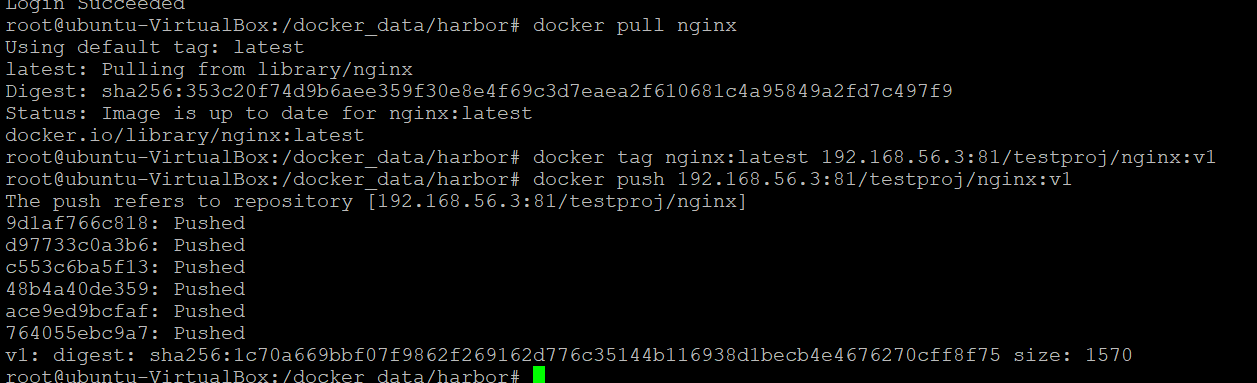
7.建立image至registry
docker pull nginx
docker tag nginx:latest 192.168.56.3:81/testproj/nginx:v1
docker push 192.168.56.3:81/testproj/nginx:v1

8.由自建registry建k8s cluster pod
1) kubectl create deployment nginx –image=192.168.56.3:81/testproj/nginx:v1


2) 確認由自建registry建k8s cluster pod
kubectl describe pod/nginx-65979d9ddb-xmmgg

9.由於Bug,導致開機無法正常啟動Harbor服務,可由service來設定
cd /etc/systemd/system
vi harbor.service
[Unit]
Description=Harbor
After=docker.service systemd-networkd.service systemdresolved.service
Requires=docker.service
Documentation=http://github.com/vmware/harbor
[Service]
Type=simple
Restart=on-failure
RestartSec=5
ExecStart=/usr/bin/docker-compose -f /docker_data/harbor/docker-compose.yml up
ExecStop=/usr/bin/docker-compose -f /docker_data/harbor/docker-compose.yml down
[Install]
WantedBy=multi-user.target
systemctl daemon-reload; systemctl enable harbor.service


 葛麗絲的分享世界