發表於 程式分享

將MySql寫log檔功能關閉(MySql5.0)

1.至/etc/my.cnf
將以log=/var/log/mysql/mysql_log
調整為#log=/var/log/mysql/mysql_log
即off掉此功能

2.mysql -u [user] -p
輸入密碼後,輸入以下指令
show variables like ‘%log%’;
會顯示log功能已關閉

+---------------------------------+------------------------------+
| Variable_name                   | Value                        |
+---------------------------------+------------------------------+
...
| log                             | OFF                          |
發表於 程式分享

Minecraft模組設計-第一步

一、建立模組工具
1.JDK
2.Minecraft forge (http://files.minecraftforge.net/, Documents: http://mcforge.readthedocs.io/en/latest/)
3.Eclipse

二、下載forge
1) http://files.minecraftforge.net/  ==> Download Mdk file

download-Mdk.png

2) 解壓縮並複製以下檔案至Eclipse workspace新創建project (Ex. minecraft)
build.gradle
gradlew (both .bat and .sh)
gradle folder

3) Command line切換至 Eclipse workspace / 新創建project (Ex. minecraft)
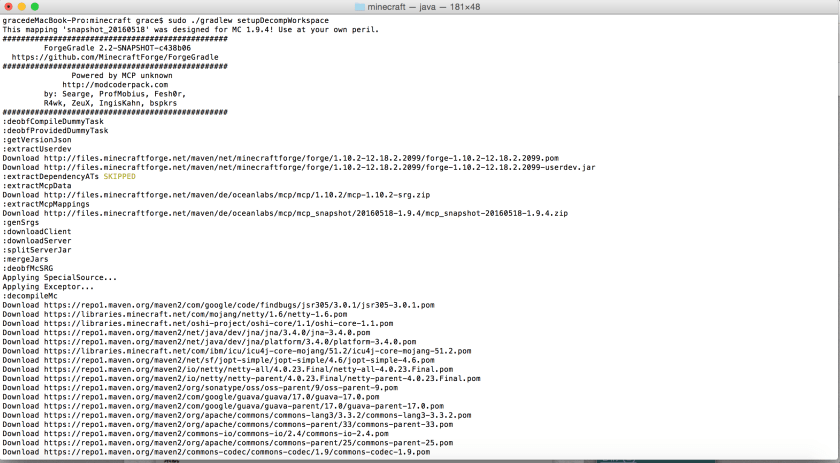
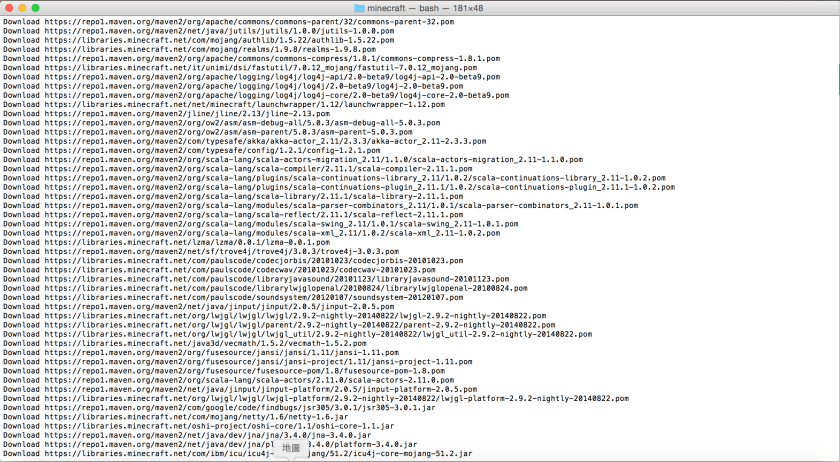
執行 ./gradlew setupDecompWorkspace (in Mac)

command-1.png

command-2.png

…最後會看到Build SUCCESSFUL

command-3.png

發表於 程式分享

Mysql insert大量資料(使用spring + hibernate)

原本一筆筆資料insert,52萬筆花了3小時,
改用Mysql的LOAD DATA從產生csv檔到Load Data至新table只花了5分鐘不到,
範例如下,請參考~

public boolean runByAll(String userName, String tableName) {
   boolean bSuccess = false;
   String filePath = ...; //取得暫存檔路徑
   BufferedWriter writer = null;
        
   String fileNameWithPath = filePath + File.separator + fileName;
   File file = new File(fileNameWithPath);
   if (file != null && file.exists() == true) {
      boolean bDeleteOK = file.delete();
      if (bDeleteOK == false) {
     logger.warn("刪除舊資料- " +  fileNameWithPath + " 失敗.");
      }
   }
        
   //1.將來源資料寫入暫存檔案 : csv格式
   ServiceEntry serviceEntry = new ServiceEntry();  
   Session session = null;
   int iTotalRow = 0;       
   Date startDate = new Date();
   try {
      writer = new BufferedWriter(new FileWriter(fileNameWithPath));
      session = serviceEntry.getSessionforTrf();
      ScrollableResults table1Cursor 
     = session.createQuery("FROM " + tableName)
        .setReadOnly(true)
        .setCacheable(false)
        .setFetchSize(1000)
        .scroll(ScrollMode.FORWARD_ONLY);
      while (table1Cursor.next()) {
     Table1 table1 = (Table1) table1Cursor.get(0);
     iTotalRow++;
     Table1PK table1PK = table1.getTable1PK(); 
     String bufferStr 
            = SystemDateTime.getFmtDate(table1PK.getTxDate(), 
               "yyyy-MM-dd HH:mm:ss") + "," + table1PK.getStockId() + "," +
          table1.getStockName() + "," + table1.getToUp() + "," + 
              table1.getToDown() + "," + table1.getLastPrice() + "," + 
              table1.getuB() + "," + table1.getlB() + "," + 
          table1.getAvgPrice() + "," + 
              SystemDateTime.getFmtDate(startDate, "yyyy-MM-dd HH:mm:ss") + 
               "," + userName + "\n";
     writer.write(bufferStr);
                
     if (iTotalRow % 1000 == 0) {
        logger.info("count now : " + iTotalRow);
        session.flush();
        session.clear();
        writer.flush();
     }
      }
            
      session.close();  
      bSuccess = true;
      logger.info("原始資料共:" + iTotalRow);
   } catch (Exception e) {
      logger.error(e);
   } finally {
      serviceEntry.closeSessionforTrf(session);
      if (writer != null) {
         try {
        writer.close();
     } catch (IOException e) {
        logger.error(e);
     }
       }
   }
        
   if (bSuccess == false) {
      return bSuccess;
   }
    
   //大量資料寫入另一Table  
   ServiceEntry2 serviceEntry2 = new ServiceEntry2();   
   Session session2 = null;
   int dbRowCount = 0;
   try {
      //1) truncate table
      session2 = serviceEntry2.getSessionforTrf();
      session2.createSQLQuery("truncate table " + tableName).executeUpdate();
            
      //2) Load Data from csv File
      String sHql_load = "LOAD DATA LOCAL INFILE :filename " + 
        " INTO TABLE " + tableName + 
        " FIELDS TERMINATED BY ',' LINES TERMINATED BY '\n' " + 
        " (@var_TxDate, StockID, StockName, toUp, toDown, LastPrice, " +
                "  UB, LB, AvgPrice, @var_ModifyTime, ModifyEmp) " +
        " SET TxDate = STR_TO_DATE(@var_TxDate,'%Y-%m-%d %H:%i:%S'), " +
        " ModifyTime = STR_TO_DATE(@var_ModifyTime,'%Y-%m-%d %H:%i:%S');";
      Query query_load = session2.createSQLQuery(sHql_load)
                                 .setString("filename", fileNameWithPath);
      dbRowCount = query_load.executeUpdate();
      bSuccess = (dbRowCount == iTotalRow) ? true : false;
   } catch (Exception e) {
      logger.error(e);
      bSuccess = false;
   } finally {
      serviceEntry.closeSessionforTrf(session2);
   }
        
   return bSuccess;
}       

Ref.http://www.codedata.com.tw/database/mysql-tutorial-19-outfile-dump-infile-import/

發表於 程式分享

Java開發excel套表

http://jxls.sourceforge.net/

有library及詳細的範例,

有興趣可參考看看…

發表於 程式分享

struts2 的struts.enable.DynamicMethodInvocation設定值

前幾日,發現網站被放上一個檔案,

經查Tomcat的access log,

是透過struts2  dynamic method invocation功能寫一上傳檔案的程式,

再透過此檔案上傳了另一個檔案,

方式如下:

http://localhost:8080/S2-032/index.action?method:%23_memberAccess%3D@ognl.OgnlContext@DEFAULT_MEMBER_ACCESS%2C%23f%3D@java.lang.Runtime@getRuntime%28%29.exec%28%23parameters.cmd….

經參考此篇文章:

http://rickgray.me/2016/05/06/review-struts2-remote-command-execution-vulnerabilities.html

緊急先將struts2.xml如下設定值改為false

<constant name=“struts.enable.DynamicMethodInvocation" value=“true" />

發表於 程式分享

IIS 8與Tocmat 8共同使用80port之設定方式

1.完成Tomcat 8及IIS 8安裝

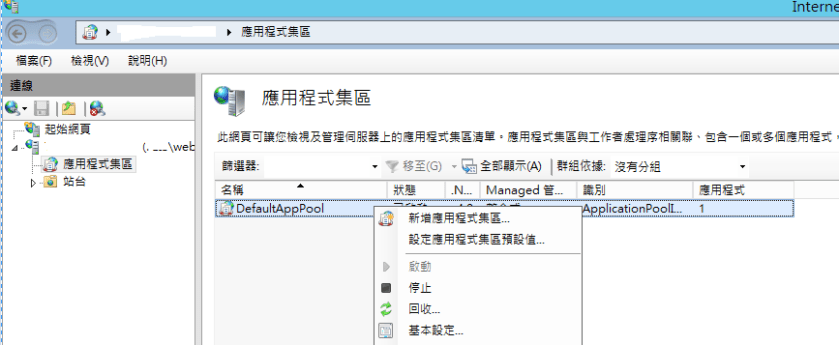
2.於IIS8 / 設定應用程式集區 : DefaultAppPool

1) 選取 “DefaultAppPool” => 右鍵 => 設定應用程式集區預設值1

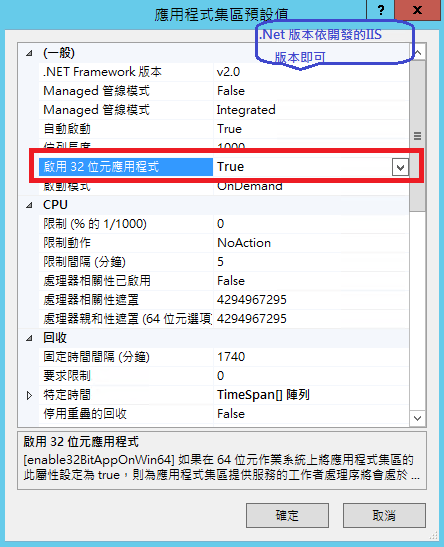
2) 啟用32位元應用程式 => False (一定要用False,否則IIS無法串tomcat)

1.png

3.執行Jakarta_isapi_redirector.reg,內容如下說明

1

1) regedit的路徑:[HKEY_LOCAL_MACHINE\SOFTWARE\Apache Software Foundation\Jakarta Isapi Redirector\1.0]
2) extension_uri : isapi_redirect.dll路徑
3) log_file : log檔名
4) log_level : log等級
5) worker_file : Ex.workers.properties
6) worker_mount_file : Ex.uniworkermap.properties

worker.properties:為將IIS與本地tomcat實例(“本地worker”)連接的基本模板。

worker.list=worker1
worker.worker1.port=8009
worker.worker1.host=localhost
worker.worker1.type=ajp13
worker.worker1.lbfactor=1

uniworkermap.properties

/*.jsp=worker1
/myweb/* =worker1

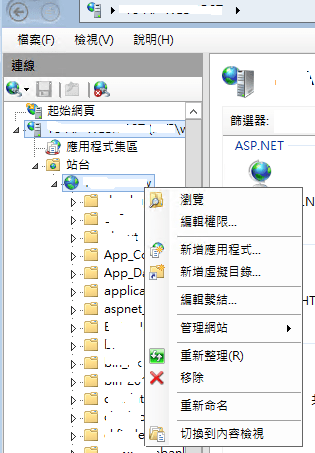
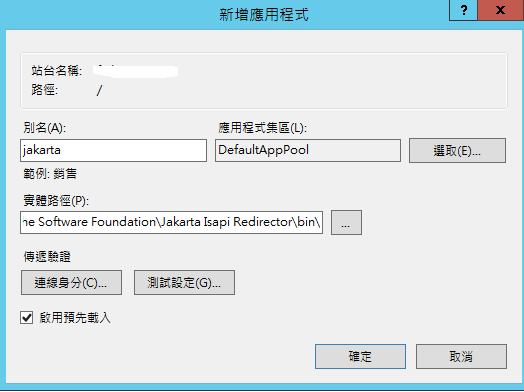
4.右鍵 => 新增應用程式

1.png

別名 : jakarta
應用程式集區 : DefaultAppPool
實體路徑 : D:\Program Files (x86)\Apache Software Foundation\Jakarta Isapi Redirector\bin\

1.png

5.設定ISAPI篩選器

1.png

右鍵 => 新增ISAPI篩選器 =>
篩選器名稱 : jakarta
執行檔 : D:\Program Files (x86)\Apache Software Foundation\Jakarta Isapi Redirector\bin\isapi_redirect.dll

1.png

1.png

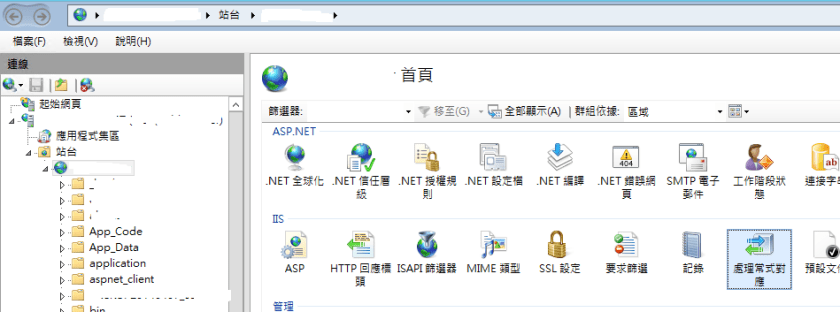
6.新增處理常式對應

1.png

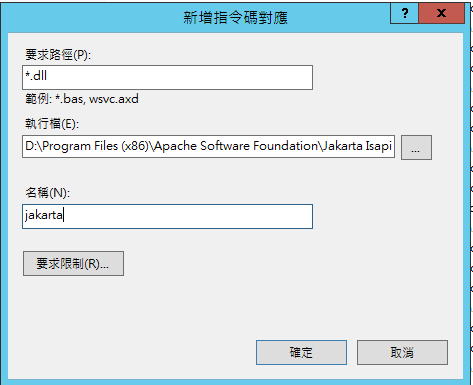
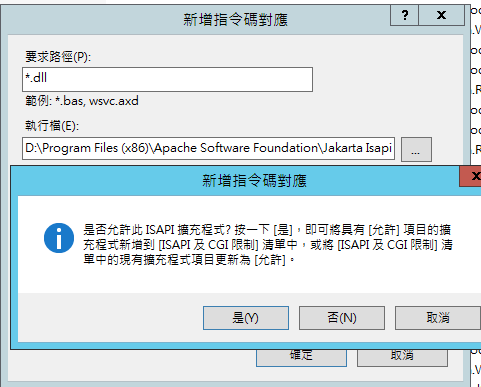
右鍵 => 新增指令對應碼

1.png

輸入
要求路徑 : *.dll
執行檔 : D:\Program Files (x86)\Apache Software Foundation\Jakarta Isapi Redirector\bin\isapi_redirect.dll
名稱 : jakarta

1.png

ISAPI及CGI限制 => 更新為”允許”

1.png

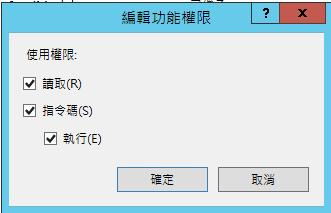
右鍵 => 編輯功能權限 => 請將使用權限 讀取、指令碼、執行 均勾選

1.png

1.png

發表於 程式分享

linux 遇到inode不夠的原因

在使用MySQL查詢時出現錯誤訊息:

Can’t create/write to file ‘/var/lib/mysql/#sql_ .MYI’ (Errcode: 28)

(後來重啟Mysql竟啟動失敗,因/var/lib/mysql/mysql.sock無法產生)

於Linux執行指令確認是disk space不足,

1

但執行指令df -h卻是尚有20%空間,

後來google發現有可能是inode不足,

執行df -i 果然inode不夠,

disk內有65萬個檔案;

後來找到路徑/var/spool/clientmqueue內共有50萬個檔案,

這個路徑的檔案是因為當cron執行時 會將相關結果以mail傳送給執行身份的帳號,

可是當sendmail 沒有啟動 那麼所有信件就會暫存在這個目錄,

因此就大膽的先刪除檔案,

檔案太多建議執行以下指令ls | xargs rm -rf刪檔,

刪除後DB就正常了。

建議若不需要傳送cron執行結果的排程最後方要加上:

1

即標準輸出、錯誤輸出均導至/dev/null刪除。

發表於 程式分享

MySQL 無法查詢及執行資料,且出現錯誤訊息SQL Error: 1030, SQLState: HY000

爬文後發現是disk滿了,

在linux 上執行command:df -h確認disk 100%,

切換至mysql log路徑,將log檔案導空 (不是刪除檔案,是導空哦),

我用的路徑及指令如下:

cd /var/log/mysql

mysql_log

發表於 程式分享

使用word功能變數,convert word to pdf,並解決中文顯示問題

使用xdocreport套件:https://github.com/opensagres/xdocreport

1.word / Ctrl + F9 => 編輯功能變數 => 設定"Merge Field",欄位名稱請加$

1.PNG1.PNG

2.程式碼

import java.awt.Color;
import java.io.File;
import java.io.FileInputStream;
import java.io.FileOutputStream;
import java.io.IOException;
import java.io.InputStream;
import java.io.OutputStream;
import org.apache.poi.xwpf.converter.pdf.PdfOptions;
import com.lowagie.text.Document;
import com.lowagie.text.DocumentException;
import com.lowagie.text.Font;
import com.lowagie.text.pdf.BaseFont;
import com.lowagie.text.pdf.PdfCopy;
import com.lowagie.text.pdf.PdfReader;
import com.lowagie.text.pdf.PdfWriter;
import fr.opensagres.xdocreport.converter.ConverterTypeTo;
import fr.opensagres.xdocreport.converter.ConverterTypeVia;
import fr.opensagres.xdocreport.converter.Options;
import fr.opensagres.xdocreport.core.XDocReportException;
import fr.opensagres.xdocreport.document.IXDocReport;
import fr.opensagres.xdocreport.document.registry.XDocReportRegistry;
import fr.opensagres.xdocreport.itext.extension.font.ITextFontRegistry;
import fr.opensagres.xdocreport.samples.docxandvelocity.model.Project;
import fr.opensagres.xdocreport.template.IContext;
import fr.opensagres.xdocreport.template.TemplateEngineKind;

public class Convert2PDF {
    public static void main(String[] args) throws DocumentException {
        try {             
              InputStream in = new FileInputStream(new File("A.docx"));
              IXDocReport report = XDocReportRegistry.getRegistry().loadReport(in, TemplateEngineKind.Velocity);
              IContext context = report.createContext();
              Project project = new Project("測試XDocReport");
              context.put("project", project);
              //功能變數替換
              context.put("fieldName1", "-1.FieldFirst中文");
              context.put("titleName2", "-2.中文MergeTitleTwo");
              context.put("parameter1", "-3.row1,value3");
              context.put("parameter2", "-4.row2,value1");
              context.put("parameter3", "-5.red,row3,value2");
             
              OutputStream out = new FileOutputStream(new File("A_Out.pdf"));
              PdfOptions pdfOptions = PdfOptions.create();
              pdfOptions.fontProvider( new ITextFontRegistry()
              {
                  public Font getFont( String familyName, String encoding, float size, int style, Color color )
                  {
                      try
                      {
                          BaseFont bfChinese =
                              BaseFont.createFont( "font/kaiu.ttf", BaseFont.IDENTITY_H, BaseFont.EMBEDDED );
                          Font fontChinese = new Font( bfChinese, size, style, color );
                          if ( familyName != null )
                              fontChinese.setFamily( familyName );
                          return fontChinese;
                      }
                      catch ( Throwable e )
                      {
                          e.printStackTrace();
                          // An error occurs, use the default font provider.
                          return ITextFontRegistry.getRegistry().getFont( familyName, encoding, size, style, color );
                      }
                  }
    
              } );
              
              Options options = Options.getTo(ConverterTypeTo.PDF).via(ConverterTypeVia.XWPF).subOptions(pdfOptions);
              report.convert(context, options, out);
             
              //加密            
              Document pdfDocument = new Document();
              PdfCopy pdfCopy = new PdfCopy(pdfDocument, new FileOutputStream("A_Out2.pdf"));
              String pwd = "testpwd";
              pdfCopy.setEncryption(pwd.getBytes(), pwd.getBytes(), 0,
                        PdfWriter.ENCRYPTION_AES_128);
              
              PdfReader pdfReader = new PdfReader("A_Out.pdf");
              int numberPage = pdfReader.getNumberOfPages();
              pdfDocument.open();
              for (int iPage = 1; iPage <= numberPage; iPage++) {
                  pdfCopy.addPage(pdfCopy.getImportedPage(pdfReader, iPage));
              }
              pdfDocument.close();
         } catch (IOException e) {
             e.printStackTrace();
         } catch (XDocReportException e) {
             e.printStackTrace();
         }
    }
}

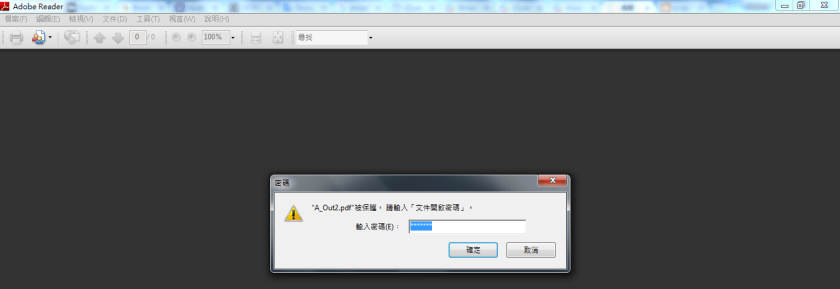
3.執行後結果:開啟"A_Out2.pdf"

1) 顯示輸入密碼
1.PNG

2) 顯示內容

1

補充:pdf檔案加密,需於執行此程式時,請下載 bcprov-jdk16-146.jar (http://www.java2s.com/Code/Jar/b/Downloadbcprovjdk16146jar.htm),
執行時classpath加上bcprov-jdk16-146.jar

補充說明:我使用的xdocReport是使用iText2,原本是要用iText7開發套表成pdf檔,但需購買pdf writer,且iText7/iText5應該需要購買商業版權,關於iText license說明如下-https://zh.wikipedia.org/wiki/IText說明請參考:

iTextSharp 4.1.6/iText 4.2.0之前的版本是在MPLLGPL許可證下分發的,
允許用戶在閉源軟體專案中使用。
2009年底,iText第5版發布,其許可證被更換為Affero通用公共許可證第3版。 
那些不願意提供其原始碼的專案,可以購買iText第5版的商業許可,
或沒有任何變化的繼續使用iText的以前版本(其許可證更寬鬆)。
然而,開發商Bruno Lowagie警告說,
第5版之前的版本可能包含非LGPL授權的代碼,
因而以前版本的閉源專案的用戶可能需要為侵犯版權負責。
雖然AGPL庫可以連結到GPL的程式,但AGPL許可證與GPL許可證不相容。
發表於 程式分享

使用iText將多個pdf檔合併成一個pdf檔

範例如下,請參考:

import com.itextpdf.text.Document;
import com.itextpdf.text.DocumentException;
import com.itextpdf.text.pdf.PdfCopy;
import com.itextpdf.text.pdf.PdfSmartCopy;
import java.io.FileOutputStream;
import java.io.IOException;
import java.util.Map;

public class mergePDF {
    public static void main(String args[]) throws IOException, DocumentException {
        //merge
        String[] files = {"filled_out_job_application.pdf", "replace_stream.pdf"};
        mergeFiles(files, "a.pdf", true);
        mergeFiles(files, "b.pdf", false);
    }

    public void mergeFiles(String[] files, String result, boolean smart) throws IOException, DocumentException {
        Document document = new Document();
        PdfCopy copy;
        if (smart)
            copy = new PdfSmartCopy(document, new FileOutputStream(result));
        else
            copy = new PdfCopy(document, new FileOutputStream(result));
        document.open();

        com.itextpdf.text.pdf.PdfReader[] reader = new com.itextpdf.text.pdf.PdfReader[3];
        for (int i = 0; i < files.length; i++) {
            reader[i] = new com.itextpdf.text.pdf.PdfReader(files[i]);
            copy.addDocument(reader[i]);
            copy.freeReader(reader[i]);
            reader[i].close();
        }
        document.close();
    }
}