發表於 程式分享

C#傳送FCM Notification Topics

1.FCMNotificationManager.cs


using System;
using System.Collections.Generic;
using System.IO;
using System.Linq;
using System.Net;
using System.Text;
using System.Web;
using System.Web.Script.Serialization;

   public class FCMNotificationManager
    {
        private NLog.Logger logger = NLog.LogManager.GetCurrentClassLogger();
        public FCMNotificationManager()
        {
        }

        public string SendNotification(string message, string title, long id)
        {
            string SERVER_API_KEY = "[請填入]";
            var SENDER_ID = "[請填入]";

            WebRequest tRequest;
            tRequest = WebRequest.Create("https://fcm.googleapis.com/fcm/send");
            tRequest.Method = "post";
            tRequest.ContentType = "application/json";
            tRequest.Headers.Add(string.Format("Authorization: key={0}", SERVER_API_KEY));
            tRequest.Headers.Add(string.Format("Sender: id={0}", SENDER_ID));

            string deviceId = "/topics/marketing";
            var data = new
            {
                to = deviceId,
                notification = new
                {
                    body = message,
                    title = title,
                    sound = "Enabled"

                }
            };
            var serializer = new JavaScriptSerializer();
            var json = serializer.Serialize(data);
            logger.Info("json: " + json);
            Byte[] byteArray = Encoding.UTF8.GetBytes(json);
            tRequest.ContentLength = byteArray.Length;

            Stream dataStream = tRequest.GetRequestStream();
            dataStream.Write(byteArray, 0, byteArray.Length);
            dataStream.Close();

            WebResponse tResponse = tRequest.GetResponse();
            dataStream = tResponse.GetResponseStream();
            StreamReader tReader = new StreamReader(dataStream);
            String sResponseFromServer = tReader.ReadToEnd();

            tReader.Close();
            dataStream.Close();
            tResponse.Close();
            return sResponseFromServer;
        }
    }

2.呼叫方式


FCMNotificationManager fcmNotificationMgr = new FCMNotificationManager();
string sResponseFromServer = fcmNotificationMgr.SendNotification("測試訊息...", "測試標題", 1);

3.SERVER_API_KEY 及 SENDER_ID
SERVER_API_KEY: 請填伺服器金鑰
SENDER_ID: 請填寄件者 ID
1

發表於 程式分享

ASP.Net新增NLog

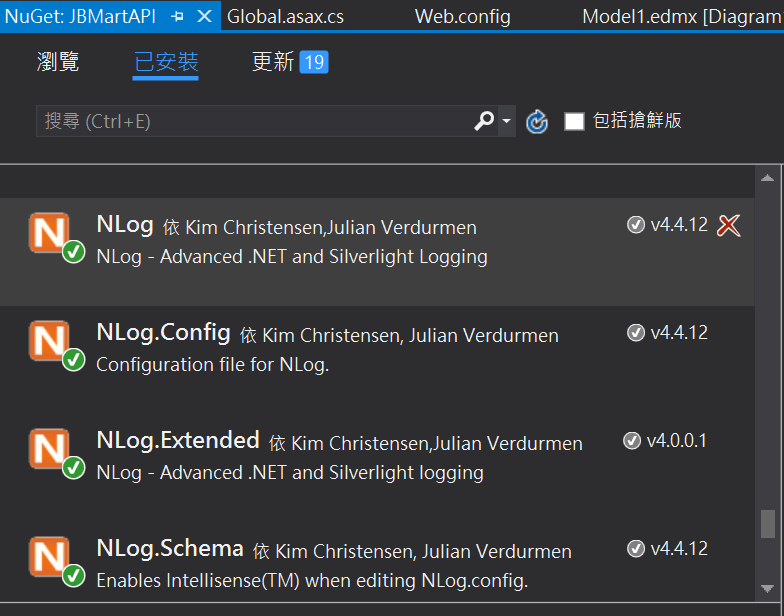
1.NuGet新增NLog套件: NLog, NLog.Config, NLog.Extended, NLog.Schema
1.PNG

2.於App_Data路徑下建立NLog.Errors路徑

3.設定NLog.config
1) targets element內新增


<target xsi:type="File" name="FiletoAppData"
            fileName="${basedir}/App_Data/NLog.Errors/${shortdate}.log"
            layout="${longdate} - ${uppercase:{level}} - ${message}"/>

2) rules element內新增


<logger name="*" minlevel="Trace" writeTo="FiletoAppData" />

4.程式內執行


logger.Info("This is a info info.");
logger.Debug("This is a debug info.");

5.程式執行後會產生檔案, Ex.2017-11-09.log

發表於 程式分享

ASP.Net C#新增排程

Global.asax.cs


using System;
using System.Collections.Generic;
using System.Diagnostics;
using System.IO;
using System.Linq;
using System.Web;
using System.Web.Caching;
using System.Web.Http;
using System.Web.Mvc;
using System.Web.Optimization;
using System.Web.Routing;
using System.Web.Security;
using System.Web.SessionState;

namespace JBMartAPI
{
    public class MvcApplication : System.Web.HttpApplication
    {
        private NLog.Logger logger = NLog.LogManager.GetCurrentClassLogger();
        private static CacheItemRemovedCallback OnCacheRemove = null;

        protected void Application_Start()
        {
            AreaRegistration.RegisterAllAreas();
            GlobalConfiguration.Configure(WebApiConfig.Register);
            FilterConfig.RegisterGlobalFilters(GlobalFilters.Filters);
            RouteConfig.RegisterRoutes(RouteTable.Routes);
            BundleConfig.RegisterBundles(BundleTable.Bundles);

            logger.Info("Start Task...");
            AddTask("Task A", 10);
            AddTask("Task B", 120);
        }
        
        private void AddTask(string name, int seconds)
        {
            OnCacheRemove = new CacheItemRemovedCallback(CacheItemRemoved);
            HttpRuntime.Cache.Insert(name, seconds, null,
                DateTime.UtcNow.AddSeconds(seconds), System.Web.Caching.Cache.NoSlidingExpiration,
                CacheItemPriority.NotRemovable, OnCacheRemove);
            //HttpRuntime.Cache.Insert(name, seconds, null, Cache.NoAbsoluteExpiration, TimeSpan.FromSeconds(seconds));
        }
        
        public void CacheItemRemoved(string key, object value, CacheItemRemovedReason reason)
        {
            //do something based on the key value
            switch (key)
            {
                case "Task A":
                    Debug.Print("Task A");
                    logger.Info("Task A");
                    break;
                case "Task B":
                    Debug.Print("Task B");
                    logger.Info("Task A");
                    break;
                default:
                    break;
            }
            //re-schedule the task cache item 
            AddTask(key, Convert.ToInt32(value));
        }
    }
}

Ref.參考http://www.steepvalley.net/background-tasks-in-asp-net-web-services-or-api/的實作。

發表於 程式分享

執行ionic serve出現cordova_not_available

解法是新增一平台為browser
ionic cordova platform add browser
再以下列指令取代ionic serve即可
ionic cordova run browser

Ref.https://stackoverflow.com/questions/38744657/ionic-2-error-cordova-not-available

發表於 程式分享

ionic新增FCM plugin無法build成android版本之處理

1.安裝cordova-plugin-fcm plugin及@ionic-native/fcm

$ ionic cordova plugin add cordova-plugin-fcm
$ npm install --save @ionic-native/fcm

2.執行ionic cordova build android會出現如下錯誤訊息

google-services plugin could not detect any version for com.google.android.gms or com.google.firebase, default version: 9.0.0 will be used

3.爬文許久發現https://firebase.google.com/docs/android/setup應是解答
1) 於platforms\android\build.gradle

buildscript {
    // ...
    dependencies {
        // ...
        classpath 'com.google.gms:google-services:3.1.1' // google-services plugin
    }
}
allprojects {
    // ...
    repositories {
        // ...
        maven {
            url "https://maven.google.com" // Google's Maven repository
        }
    }
}

2) plugins\cordova-plugin-fcm\FCMPlugin.gradle
classpath ‘com.google.gms:google-services:+’調整成classpath ‘com.google.gms:google-services:3.1.1’

buildscript {
    repositories {
            jcenter()
            mavenLocal()
        }
    dependencies {
        classpath 'com.android.tools.build:gradle:+'
        classpath 'com.google.gms:google-services:3.1.1'
    }
}

4.執行ionic cordova build android會出現如下錯誤訊息

* What went wrong:
Execution failed for task ':app:mergeDebugResources'.
Process 'command 'C:\Android\SDK\build-tools\23.0.1\aapt.exe'' finished with exit value 1 (state: FAILED)
...

5.最終參考這兩篇https://forum.ionicframework.com/t/google-services-version-conflict-maps-fcm/93695/9https://stackoverflow.com/questions/35674066/errorexecution-failed-for-task-appprocessdebugresources-java-io-ioexcept調整如下設定
1) plugins\cordova-plugin-fcm\FCMPlugin.gradle
將以下兩行註記為不使用

// classpath 'com.google.gms:google-services:3.0.0'
// apply plugin: com.google.gms.googleservices.GoogleServicesPlugin

2) plugins\cordova-plugin-fcm\plugin.xml
調整以下兩行版本
<framework src="com.google.firebase:firebase-core:11.4.2″ />
<framework src="com.google.firebase:firebase-messaging:11.4.2″ />
3) 移除ionic cordova平台android
ionic cordova platform rm android
4) 再build android
ionic cordova build android
5) 於platforms\android\build.gradle
增加classpath ‘com.google.gms:google-services:3.1.1’

buildscript {
    repositories {
        mavenCentral()
        jcenter()
    }
    dependencies {
        classpath 'com.android.tools.build:gradle:2.1.0'
    classpath 'com.google.gms:google-services:3.1.1'
    }
}
allprojects {
    // ...
    repositories {
        // ...
        maven {
            url "https://maven.google.com" // Google's Maven repository
        }
    }
}

6) 於platforms\android\build.gradle
最後一行加上
apply plugin: ‘com.google.gms.google-services’
7) 於platforms\android\build.gradle
依android tool目前最大的版本執行

    compileSdkVersion 27
    buildToolsVersion "27.0.0"

註1:原為
compileSdkVersion cdvcompileSdkVersion
buildToolsVersion cdvbuildToolsVersion
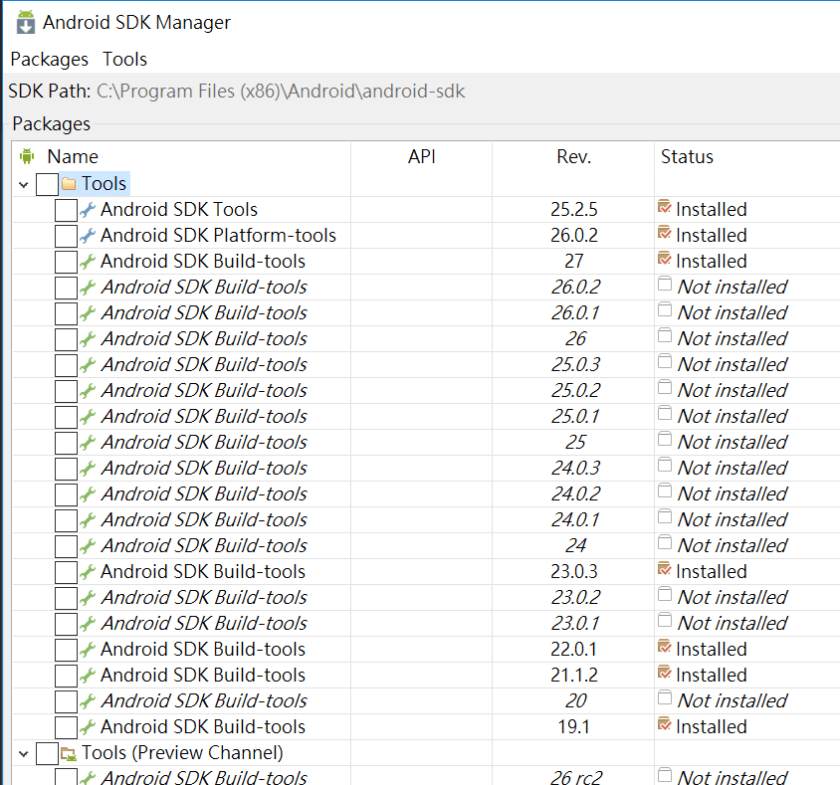
註2:android tool版本確認方式如下圖Android SDK Manager
1

發表於 程式分享

申請FCM推播帳號

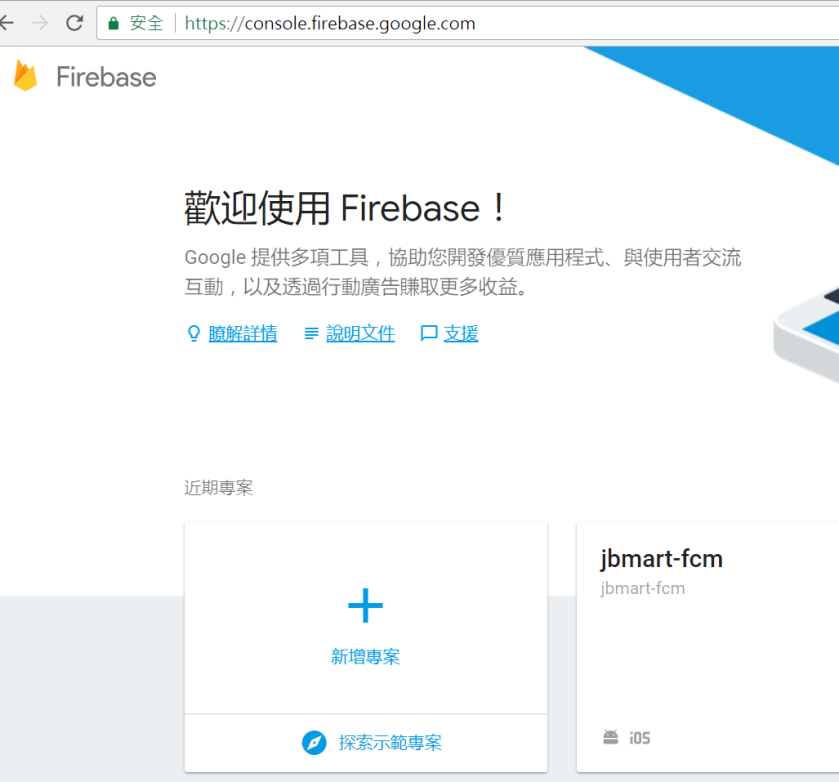
1.以google帳號登入firebase
URL: https://console.firebase.google.com

2.建立專案: 輸入專案名稱及國家/地區
1

3.於專案內新增應用程式
1.PNG

4.將Firebase加入iOS應用程式
– iOS 連結ID 為 APP ID (bundle ID)
– 將檔案GoogleService-Info.plist下載至 cordova專案跟目錄
– iOS須再加入APNS憑證,後續申請再補充。

5.將Firebase加入Android應用程式
– Android 套件名稱 一樣為 APP ID
– 將檔案google-services.json下載至 cordova專案跟目錄

補充: APP ID (bundle ID)於ionic在config.xml的widget element內的id
1.PNG

發表於 程式分享

ionic cordova plugin add cordova-plugin-qrscanner執行錯誤之處理

執行

ionic cordova plugin add cordova-plugin-qrscanner

出現

Failed to install 'cordova-plugin-qrscanner': CordovaError: Failed to fetch plugin cordova-plugin-swift-support via registry.
Probably this is either a connection problem, or plugin spec is incorrect.
Check your connection and plugin name/version/URL.
Error: cmd: Command failed with exit code 4294963238 Error output:
...

後找到說明,加上參數

ionic cordova plugin add cordova-plugin-qrscanner --nofetch

Ref.https://cordova.apache.org/news/2017/05/04/cordova-7.html

發表於 程式分享

執行npm install 出現 npm ERR! Please try running this command again as root/Administrator處理方式

此指令執行
npm install -g webpack webpack-dev-server typescript –verbose
會出現 npm ERR! Please try running this command again as root/Administrator
網路上的解法是用sudo,
但為windows環境,
找到的解法是加上–no-optional參數就可正確執行了
npm install -g webpack webpack-dev-server typescript –verbose –no-optional

發表於 程式分享

typescript之三: 類別說明

1.class.ts

    
//1.class
console.log('1.class');
class House {
    //private door: number;
    constructor(public door: number) {
        this.door = door;
    }
    
    getDoor(width: number, height: number) {
        console.log('size: ' + (width * height * this.door));
    }
    
    public retriveDoor() {
        return this.door;
    }
}

let house = new House(5);
house.getDoor(20, 30);

class NewHouse extends House {
    name: string;
    constructor(door: number, name: string) {
        super(door);
        this.name = name;        
    }
    
    getDoor(width: number, height: number) {
        console.log('name: ' + this.name);
        console.log('door: ' + super.retriveDoor());
        super.getDoor(width, height);
    }
}

let newHouse = new NewHouse(5, 'Grace');
newHouse.getDoor(25, 30);

//2.class
console.log('2.abstract class');
abstract class Shape {
    abstract area(): number;
    myname(): void {
        console.log('My name is shape');
    }
}

class Rect extends Shape {
    area(): number {
        return 100;
    }
}

let shape: Shape;
//error TS2511: Cannot create an instance of the abstract class 'Shape'
//shape = new Shape();
shape = new Rect();
console.log('shape.area(): ' + shape.area());


2.compiler
tsc class.ts

3.產出的 class.js

    
var __extends = (this && this.__extends) || (function () {
    var extendStatics = Object.setPrototypeOf ||
        ({ __proto__: [] } instanceof Array && function (d, b) { d.__proto__ = b; }) ||
        function (d, b) { for (var p in b) if (b.hasOwnProperty(p)) d[p] = b[p]; };
    return function (d, b) {
        extendStatics(d, b);
        function __() { this.constructor = d; }
        d.prototype = b === null ? Object.create(b) : (__.prototype = b.prototype, new __());
    };
})();
//1.class
console.log('1.class');
var House = /** @class */ (function () {
    //private door: number;
    function House(door) {
        this.door = door;
        this.door = door;
    }
    House.prototype.getDoor = function (width, height) {
        console.log('size: ' + (width * height * this.door));
    };
    House.prototype.retriveDoor = function () {
        return this.door;
    };
    return House;
}());
var house = new House(5);
house.getDoor(20, 30);
var NewHouse = /** @class */ (function (_super) {
    __extends(NewHouse, _super);
    function NewHouse(door, name) {
        var _this = _super.call(this, door) || this;
        _this.name = name;
        return _this;
    }
    NewHouse.prototype.getDoor = function (width, height) {
        console.log('name: ' + this.name);
        console.log('door: ' + _super.prototype.retriveDoor.call(this));
        _super.prototype.getDoor.call(this, width, height);
    };
    return NewHouse;
}(House));
var newHouse = new NewHouse(5, 'Grace');
newHouse.getDoor(25, 30);
//2.class
console.log('2.abstract class');
var Shape = /** @class */ (function () {
    function Shape() {
    }
    Shape.prototype.myname = function () {
        console.log('My name is shape');
    };
    return Shape;
}());
var Rect = /** @class */ (function (_super) {
    __extends(Rect, _super);
    function Rect() {
        return _super !== null && _super.apply(this, arguments) || this;
    }
    Rect.prototype.area = function () {
        return 100;
    };
    return Rect;
}(Shape));
var shape;
//error TS2511: Cannot create an instance of the abstract class 'Shape'
//shape = new Shape();
shape = new Rect();
console.log('shape.area(): ' + shape.area());


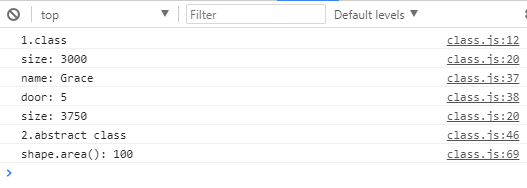
4.執行結果
1.PNG

發表於 程式分享

typescript之二: 函數說明

1.fnuc.ts


//1.two parameter
console.log('1.two parameter');
function max1(x: number, y: number): number {
    return (x > y) ? x : y;
}

let result_max1 = max1(33, 66);
console.log('result_max1: ' + result_max1);

//2.1 ~ 2 parameter
console.log('2.1 ~ 2 parameter');
function max2(x: number, y?: number): number {
    if (y)
        return (x > y) ? x : y;
    else
        return x;
}

let result_max2 = max2(33);
console.log('result_max2: ' + result_max2);

//3.default parameter
console.log('3.default parameter');
function max3(x: number, y = 44): number {
    return (x > y) ? x : y;    
}

let result_max3_1 = max3(33);
console.log('result_max3_1: ' + result_max3_1);

let result_max3_2 = max3(33, 22);
console.log('result_max3_2: ' + result_max3_2);

let result_max3_3 = max3(33, undefined);
console.log('result_max3_3: ' + result_max3_3);

//4.first default parameter
console.log('4.first default parameter');
function max4(x: number = 44, y : number): number {
    return (x > y) ? x : y;    
}

let result_max4_1 = max4(undefined, 33);
console.log('result_max4_1: ' + result_max4_1);

let result_max4_2 = max4(22, 33);
console.log('result_max4_2: ' + result_max4_2);

//5.many paramter
console.log('5.many paramter');
function sum(x: number, ...numbers: number[]): number {
    let total = x;
    for (let idx = 0; idx < numbers.length; idx++)         total += numbers[idx];     return total; } let total = sum(1, 2, 3, 4, 5); console.log('total: ' + total); //6.function overload console.log('6.function overload'); function func(config: number[]); function func(config: number, value: number); function func(config: string, value: string); function func(config: any, value?: any) {     console.log('config: ' + config);     console.log('value: ' + value); } console.log('func ==> ');
func([5, 6]);
console.log('func ==> ');
func('test1', 'test2');
console.log('func ==> ');
func(1, 2);

//7.this
console.log('7.this');
let data = {
    datas: ['data1', 'data2', 'data3', 'data4'],
    dataPicker: function() {
        return () => {
            let pickedIdx = Math.floor(Math.random() * 4);
            return this.datas[pickedIdx];
        }
    }
}

let pickData = data.dataPicker();
console.log('pickData(): ' + pickData());
    

2.compiler
tsc func.ts

3.產出的 func.js


//1.two parameter
console.log('1.two parameter');
function max1(x, y) {
    return (x > y) ? x : y;
}
var result_max1 = max1(33, 66);
console.log('result_max1: ' + result_max1);
//2.1 ~ 2 parameter
console.log('2.1 ~ 2 parameter');
function max2(x, y) {
    if (y)
        return (x > y) ? x : y;
    else
        return x;
}
var result_max2 = max2(33);
console.log('result_max2: ' + result_max2);
//3.default parameter
console.log('3.default parameter');
function max3(x, y) {
    if (y === void 0) { y = 44; }
    return (x > y) ? x : y;
}
var result_max3_1 = max3(33);
console.log('result_max3_1: ' + result_max3_1);
var result_max3_2 = max3(33, 22);
console.log('result_max3_2: ' + result_max3_2);
var result_max3_3 = max3(33, undefined);
console.log('result_max3_3: ' + result_max3_3);
//4.first default parameter
console.log('4.first default parameter');
function max4(x, y) {
    if (x === void 0) { x = 44; }
    return (x > y) ? x : y;
}
var result_max4_1 = max4(undefined, 33);
console.log('result_max4_1: ' + result_max4_1);
var result_max4_2 = max4(22, 33);
console.log('result_max4_2: ' + result_max4_2);
//5.many paramter
console.log('5.many paramter');
function sum(x) {
    var numbers = [];
    for (var _i = 1; _i < arguments.length; _i++) {
        numbers[_i - 1] = arguments[_i];
    }
    var total = x;
    for (var idx = 0; idx < numbers.length; idx++)         total += numbers[idx];     return total; } var total = sum(1, 2, 3, 4, 5); console.log('total: ' + total); //6.function overload console.log('6.function overload'); function func(config, value) {     console.log('config: ' + config);     console.log('value: ' + value); } console.log('func ==> ');
func([5, 6]);
console.log('func ==> ');
func('test1', 'test2');
console.log('func ==> ');
func(1, 2);
//7.this
console.log('7.this');
var data = {
    datas: ['data1', 'data2', 'data3', 'data4'],
    dataPicker: function () {
        var _this = this;
        return function () {
            var pickedIdx = Math.floor(Math.random() * 4);
            return _this.datas[pickedIdx];
        };
    }
};
var pickData = data.dataPicker();
console.log('pickData(): ' + pickData());
    

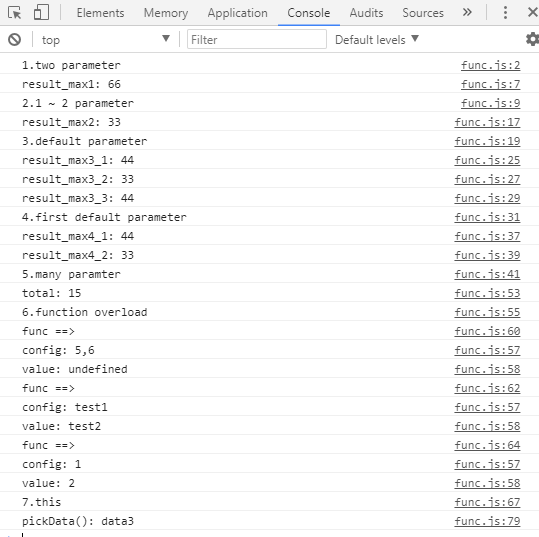
4.執行結果
1.PNG