發表於 程式分享

typescript之一: 基本型態說明

1.basicType.ts


//1.boolean
console.log('1.boolean');

let flag: boolean = true;
console.log('flag: ' + flag);

//2.number
console.log('2.number');

let binaryLiteral: number = 0b11010;
let octalLiteral: number = 0o622;
let decLiteral: number = 12;
let hexLiteral: number = 0xb00a;

console.log('binaryLiteral :' + binaryLiteral);
console.log('octalLiteral :' + octalLiteral);
console.log('decLiteral :' + decLiteral);
console.log('hexLiteral :' + hexLiteral);

//3.string
console.log('3.string');

let prog: string = "Angular 2";
let seconds: number = 55;
let data: string = `這程式是 ${prog}, 經過 ${ seconds } 秒`;

console.log('prog :' + prog);
console.log('seconds :' + seconds);
console.log('data :' + data);

//4.number array
console.log('4.number array');
let numarr1: number[] = [4, 3, 2, 1];
let numarr2: Array = [1, 2];

console.log('numarr1.length :' + numarr1.length);
numarr1.forEach(function (num1) {
    console.log('num1: ' + num1);
}.bind(this));

console.log('numarr2.length :' + numarr2.length);
numarr2.forEach(function (num2) {
    console.log('num2: ' + num2);
}.bind(this));

//5.mix array
console.log('5.mix array');
let mixarr: [string, string, number, number];
mixarr = ['string1', 'string2', 2, 1];

console.log('mixarr.length :' + mixarr.length);
mixarr.forEach(function (data1) {
    console.log('data1: ' + data1);
}.bind(this));

//6.enum
console.log('6.enum');
enum Shape { Circle, Rect, Oval };
let s: Shape = Shape.Oval;
console.log('s: ' + s);

enum Shape2 { Circle = 9, Rect, Oval = 6 };
let s2: Shape2 = Shape2.Rect;
console.log('s2: ' + s2);

//7.any
console.log('7.any');
let any1: any = 1;
console.log('any1: ' + any1);
//console.log('any1.ifItExists(): ' + any1.ifItExists());
console.log('any1.toFixed(): ' + any1.toFixed());

any1 = '程式';
console.log('any1: ' + any1);
//console.log('any1.ifItExists(): ' + any1.ifItExists());
//console.log('any1.toFixed(): ' + any1.toFixed());

any1 = false;
console.log('any1: ' + any1);
//console.log('any1.ifItExists(): ' + any1.ifItExists());
//console.log('any1.toFixed(): ' + any1.toFixed());

let array: any[] = [ true, "hello", 333 ];
array.forEach(function (arrdata1) {
    console.log('arrdata1: ' + arrdata1);
}.bind(this));

array[2] = "yes";
array.forEach(function (arrdata2) {
    console.log('arrdata2: ' + arrdata2);
}.bind(this));

//8.null and undefined
console.log('8.null and undefined');
let nulldata : number;
nulldata = 3;
console.log('nulldata: ' + nulldata);

nulldata = undefined;
console.log('nulldata: ' + nulldata);

nulldata = null;
console.log('nulldata: ' + nulldata);

let nulldata2 : number | undefined;
nulldata2 = 3;
console.log('nulldata2: ' + nulldata2);

nulldata2 = undefined;
console.log('nulldata2: ' + nulldata2);

nulldata2 = null;
console.log('nulldata2: ' + nulldata2);

let nulldata3 : number | null | undefined;
nulldata3 = 3;
console.log('nulldata3: ' + nulldata3);

nulldata3 = undefined;
console.log('nulldata3: ' + nulldata3);

nulldata3 = null;
console.log('nulldata3: ' + nulldata3);

//9.void
console.log('9.void');
function func1(): void {
    console.log('test for func1()');
}

func1();

//10.never
console.log('10.never');
let val1: never;
let val2: number;

//compiler => error TS2322: Type '333' is not assignable to type 'never'.
//val1 = 333;
//val1 = (() => { throw new Error('val1: Exception occur for nerver') })();
//val2 = (() => { throw new Error('val2: Exception occur for nerver') })();

//11.const
const CONSTVAL = 123;
const hello = {
  title: "Hi",
  content: CONSTVAL
};

console.log('hello.title: ' + hello.title);
console.log('hello.content: ' + hello.content);

//12.數值結構
console.log(`12.數值結構`);
let fromData = [1, 3];
let [one, three] = fromData;

console.log('one: ' + one);
console.log('three: ' + three);

function func2([first, second]: [number, number]) {
    console.log(first + second);
}

func2([33, 44]);

let [first, ...rest] = [4, 3, 2, 1];
console.log('first: ' + first);
console.log('rest: ' + rest);

//13.結構
console.log(`13.結構`);
let arraytest = { a: 3, b: 15, w: 6, h: 30};
let { a, b, w, h } = arraytest;
console.log(a, b, w, h);
    

2.compiler
tsc basicType.ts

3.產出的basicType.js


//1.boolean
console.log('1.boolean');
var flag = true;
console.log('flag: ' + flag);
//2.number
console.log('2.number');
var binaryLiteral = 26;
var octalLiteral = 402;
var decLiteral = 12;
var hexLiteral = 0xb00a;
console.log('binaryLiteral :' + binaryLiteral);
console.log('octalLiteral :' + octalLiteral);
console.log('decLiteral :' + decLiteral);
console.log('hexLiteral :' + hexLiteral);
//3.string
console.log('3.string');
var prog = "Angular 2";
var seconds = 55;
var data = "\u9019\u7A0B\u5F0F\u662F " + prog + ", \u7D93\u904E " + seconds + " \u79D2";
console.log('prog :' + prog);
console.log('seconds :' + seconds);
console.log('data :' + data);
//4.number array
console.log('4.number array');
var numarr1 = [4, 3, 2, 1];
var numarr2 = [1, 2];
console.log('numarr1.length :' + numarr1.length);
numarr1.forEach(function (num1) {
    console.log('num1: ' + num1);
}.bind(this));
console.log('numarr2.length :' + numarr2.length);
numarr2.forEach(function (num2) {
    console.log('num2: ' + num2);
}.bind(this));
//5.mix array
console.log('5.mix array');
var mixarr;
mixarr = ['string1', 'string2', 2, 1];
console.log('mixarr.length :' + mixarr.length);
mixarr.forEach(function (data1) {
    console.log('data1: ' + data1);
}.bind(this));
//6.enum
console.log('6.enum');
var Shape;
(function (Shape) {
    Shape[Shape["Circle"] = 0] = "Circle";
    Shape[Shape["Rect"] = 1] = "Rect";
    Shape[Shape["Oval"] = 2] = "Oval";
})(Shape || (Shape = {}));
;
var s = Shape.Oval;
console.log('s: ' + s);
var Shape2;
(function (Shape2) {
    Shape2[Shape2["Circle"] = 9] = "Circle";
    Shape2[Shape2["Rect"] = 10] = "Rect";
    Shape2[Shape2["Oval"] = 6] = "Oval";
})(Shape2 || (Shape2 = {}));
;
var s2 = Shape2.Rect;
console.log('s2: ' + s2);
//7.any
console.log('7.any');
var any1 = 1;
console.log('any1: ' + any1);
//console.log('any1.ifItExists(): ' + any1.ifItExists());
console.log('any1.toFixed(): ' + any1.toFixed());
any1 = '程式';
console.log('any1: ' + any1);
//console.log('any1.ifItExists(): ' + any1.ifItExists());
//console.log('any1.toFixed(): ' + any1.toFixed());
any1 = false;
console.log('any1: ' + any1);
//console.log('any1.ifItExists(): ' + any1.ifItExists());
//console.log('any1.toFixed(): ' + any1.toFixed());
var array = [true, "hello", 333];
array.forEach(function (arrdata1) {
    console.log('arrdata1: ' + arrdata1);
}.bind(this));
array[2] = "yes";
array.forEach(function (arrdata2) {
    console.log('arrdata2: ' + arrdata2);
}.bind(this));
//8.null and undefined
console.log('8.null and undefined');
var nulldata;
nulldata = 3;
console.log('nulldata: ' + nulldata);
nulldata = undefined;
console.log('nulldata: ' + nulldata);
nulldata = null;
console.log('nulldata: ' + nulldata);
var nulldata2;
nulldata2 = 3;
console.log('nulldata2: ' + nulldata2);
nulldata2 = undefined;
console.log('nulldata2: ' + nulldata2);
nulldata2 = null;
console.log('nulldata2: ' + nulldata2);
var nulldata3;
nulldata3 = 3;
console.log('nulldata3: ' + nulldata3);
nulldata3 = undefined;
console.log('nulldata3: ' + nulldata3);
nulldata3 = null;
console.log('nulldata3: ' + nulldata3);
//9.void
console.log('9.void');
function func1() {
    console.log('test for func1()');
}
func1();
//10.never
console.log('10.never');
var val1;
var val2;
//compiler => error TS2322: Type '333' is not assignable to type 'never'.
//val1 = 333;
//val1 = (() => { throw new Error('val1: Exception occur for nerver') })();
//val2 = (() => { throw new Error('val2: Exception occur for nerver') })();
//11.const
var CONSTVAL = 123;
var hello = {
    title: "Hi",
    content: CONSTVAL
};
console.log('hello.title: ' + hello.title);
console.log('hello.content: ' + hello.content);
//12.數值結構
console.log("12.\u6578\u503C\u7D50\u69CB");
var fromData = [1, 3];
var one = fromData[0], three = fromData[1];
console.log('one: ' + one);
console.log('three: ' + three);
function func2(_a) {
    var first = _a[0], second = _a[1];
    console.log(first + second);
}
func2([33, 44]);
var _a = [4, 3, 2, 1], first = _a[0], rest = _a.slice(1);
console.log('first: ' + first);
console.log('rest: ' + rest);
//13.結構
console.log("13.\u7D50\u69CB");
var arraytest = { a: 3, b: 15, w: 6, h: 30 };
var a = arraytest.a, b = arraytest.b, w = arraytest.w, h = arraytest.h;
console.log(a, b, w, h);
    

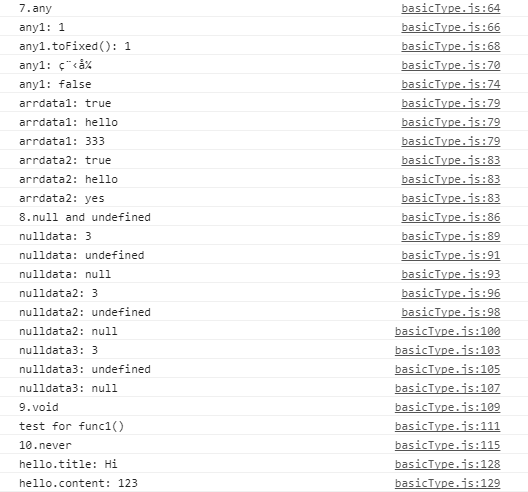
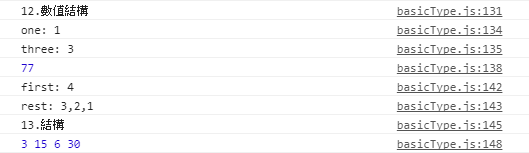
4.執行結果
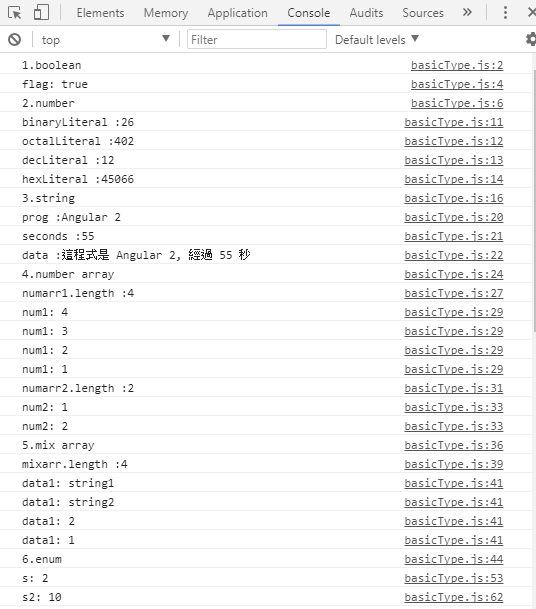
1.PNG
2.PNG
3.PNG

發表於 程式分享

ionic2 產生 event並儲存最後時間,並以Timer去計算

1.tabs.tsc


import { Component } from '@angular/core';
import { IonicPage, NavController, MenuController, Events } from 'ionic-angular';
import { Subscription } from "rxjs";
import { TimerObservable } from "rxjs/observable/timerObservable";

@IonicPage()
@Component({
  selector: 'page-tabs',
  templateUrl: 'tabs.html'
})
export class TabsPage {
  lastPing?: Date = null;
  private subscription: Subscription;
  
  constructor(public navCtrl: NavController, public menuCtrl: MenuController, public events: Events) {
  }
  
  ionViewDidLoad() {
    this.lastPing = new Date();
    this.events.subscribe('user:click', (info, time) => {
        console.log('user:click', info, 'at', time);
        this.lastPing = new Date();
    });
    
    let timer = TimerObservable.create(20000, 5000);
    this.subscription = timer.subscribe(t => {
      console.log('ionViewDidLoad t: ' + t);
      
      var now = new Date();
      var diff = this.toSeconds(now - this.lastPing);
      console.log(diff.toString());

    });
  }
  
  toSeconds(diff) {
      var ms = diff % 1000;
      diff = (diff - ms) / 1000;
      var secs = diff % 60;
      diff = (diff - secs) / 60;
      var mins = diff % 60;
      
      return mins;
  }
  
  ionViewDidLeave() {
    this.subscription.unsubscribe();
  }
    
  openMenu(menuId : any) {
    this.events.publish('user:click', 'openMenu', Date.now());    
  }  
}
    

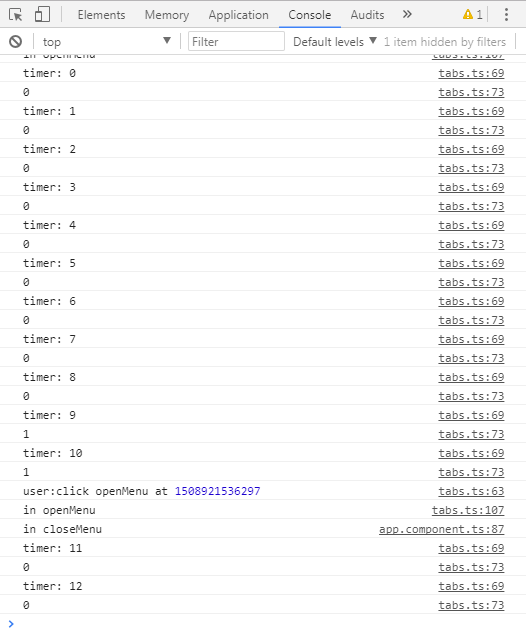
2.結果畫面
1.PNG

發表於 程式分享

ionic2 產生 QRCode

ionic2 產生 QRCode
1.安裝
cd [ionic Project Directory]
npm install angularx-qrcode –save
2.qrcode.module.ts


import { NgModule } from '@angular/core';
import { IonicPageModule } from 'ionic-angular';
import { QRCodeModule } from 'angularx-qrcode';
import { QrcodePage } from './qrcode';

@NgModule({
  declarations: [
    QrcodePage
  ],
  imports: [
    IonicPageModule.forChild(QrcodePage),
    QRCodeModule
  ]
})
export class QrcodePageModule {}
  

3.qrcode.tsc


import { Component } from '@angular/core';
import { IonicPage, NavController, NavParams } from 'ionic-angular';
import { QRCodeModule } from 'angularx-qrcode';

@IonicPage()
@Component({
  selector: 'page-qrcode',
  templateUrl: 'qrcode.html'
})
export class QrcodePage {
  encodeData2 : string = '1234';
  
  constructor(public navCtrl: NavController, public navParams: NavParams, private qrScanner: QRScanner) {
  }

  ionViewDidLoad() {
    console.log('ionViewDidLoad QrcodePage');
  }
}   
    

4.qrcode.html

<ion-header>
 <ion-navbar>
 <ion-title text-center>QRCode</ion-title>
 </ion-navbar>
</ion-header>
<ion-content padding>
 <ion-card>
 <ion-card>
 <qrcode [qrdata]="'My QR code data string'" [size]="256" [level]="'M'"></qrcode>
 </ion-card>
 </ion-card>
 
 <ion-card>
 <ion-card-header class="text-c">
 <ion-input type="text" [(ngModel)]="encodeData2" name="encodeData2" placeholder="請輸入QRCode"></ion-input>
 </ion-card-header>
 <ion-card>
 <qrcode [qrdata]="encodeData2" [size]="256" [level]="'M'"></qrcode>
 </ion-card>
 </ion-card>
</ion-content>

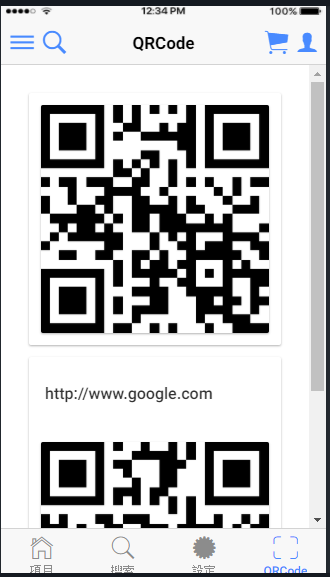
5.結果畫面
1.PNG

參考: https://github.com/Cordobo/angularx-qrcode

發表於 程式分享

request JSON出現No ‘Access-Control-Allow-Origin’ header is present及OPTIONS 405 Method Not Allowed

一、Tomcat8
由ionic2 撰寫 App POST 呼叫Tomcat8 Server程式時出現
No ‘Access-Control-Allow-Origin’ header is present,
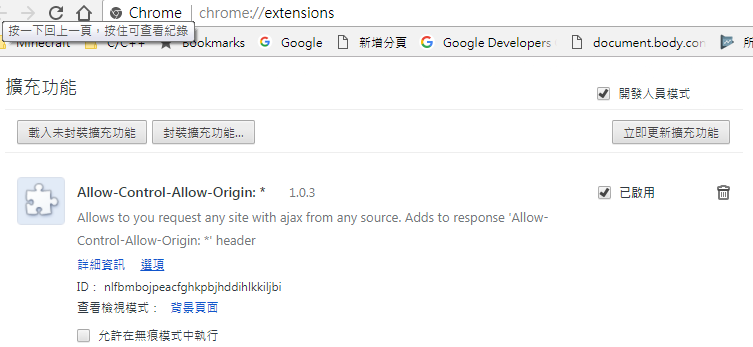
雖於Chrome加上Allow-Control-Allow-Origin擴充功能,
1.PNG
仍出現錯誤訊息OPTIONS 405 Method Not Allowed,
經查原因
因為在跨域且嘗試添加一些特殊頭及自定義頭的情況下,
由於瀏覽器的安全機制 會加多一次OPTIONS預請求(詢問請求),
與跨域服務器協商可以設置的頭部信息,可以允許的HTTP協議等等信息。
即雖用POST,會先用OPTIONS詢問是否可使用OPTIONS,
故需在 OPTIONS 的 header 加上相關資訊,
解法可參考:https://tomcat.apache.org/tomcat-8.0-doc/config/filter.html#CORS_Filter/Introduction

<filter>
  <filter-name>CorsFilter</filter-name>
  <filter-class>org.apache.catalina.filters.CorsFilter</filter-class>
  <init-param>
    <param-name>cors.allowed.origins</param-name>
    <param-value>*</param-value>
  </init-param>
  <init-param>
    <param-name>cors.allowed.methods</param-name>
    <param-value>GET,POST,HEAD,OPTIONS,PUT</param-value>
  </init-param>
  <init-param>
    <param-name>cors.allowed.headers</param-name>
    <param-value>Content-Type,X-Requested-With,accept,Origin,Access-Control-Request-Method,Access-Control-Request-Headers</param-value>
  </init-param>
  <init-param>
    <param-name>cors.exposed.headers</param-name>
    <param-value>Access-Control-Allow-Origin,Access-Control-Allow-Credentials</param-value>
  </init-param>
  <init-param>
    <param-name>cors.support.credentials</param-name>
    <param-value>true</param-value>
  </init-param>
  <init-param>
    <param-name>cors.preflight.maxage</param-name>
    <param-value>10</param-value>
  </init-param>
</filter>
<filter-mapping>
  <filter-name>CorsFilter</filter-name>
  <url-pattern>/*</url-pattern>
</filter-mapping>

二、IIS的解法
於Web.config設定


<system.webServer>
    ...
    <!-- No 'Access-Control-Allow-Origin' header is present on the requested resource.  -->
    <httpProtocol>
      <customHeaders>
        <add name="Access-Control-Allow-Origin" value="*" />
        <add name="Access-Control-Allow-Headers" value="Content-Type" />
        <add name="Access-Control-Allow-Methods" value="GET, POST, PUT, DELETE, OPTIONS" />
      </customHeaders>
    </httpProtocol>
  </system.webServer>
發表於 程式分享

ionic 2 切換不同選單

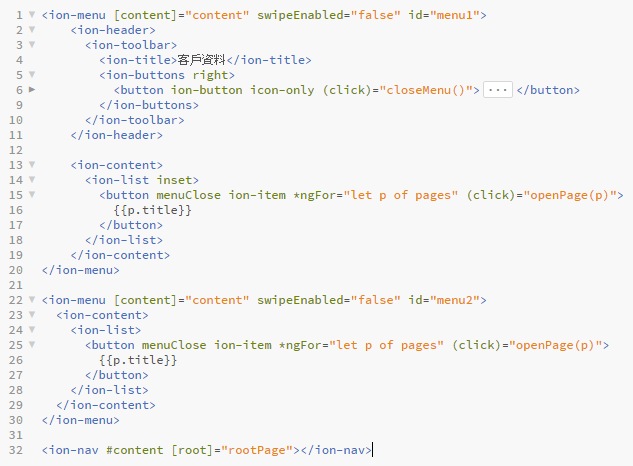
1.先設定 2 個 ion-menu tag,分別有不同id
且openMenu分別傳送不同值
Ex.
1.PNG

2.ts檔內的openMenu function可接收不同值做判斷
Ex.

import { IonicPage, NavController, MenuController, Platform } from 'ionic-angular';

...

@IonicPage()
@Component({
  selector: 'page-test',
  templateUrl: 'test.html'
})
export class TabsPage {
  constructor(public menuCtrl: MenuController) {
  }

  openMenu(menuId : int) {
    console.log('in openMenu');
    if (menuId == 2) {
        this.menuCtrl.enable(false, 'menu1');
        this.menuCtrl.enable(true, 'menu2');
    } else {
        this.menuCtrl.enable(true, 'menu1');
        this.menuCtrl.enable(false, 'menu2');
    }
    
    this.menuCtrl.open();
  }  
}
發表於 程式分享

ionic 2設置app圖標和啟動動畫

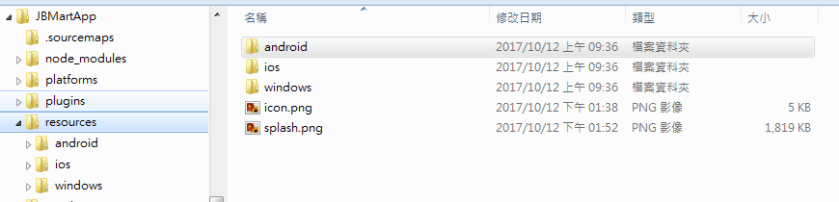
原以為產生app圖標及啟動動畫之圖檔需要由美工產生
1.PNG

發現ionic有好用的工具,
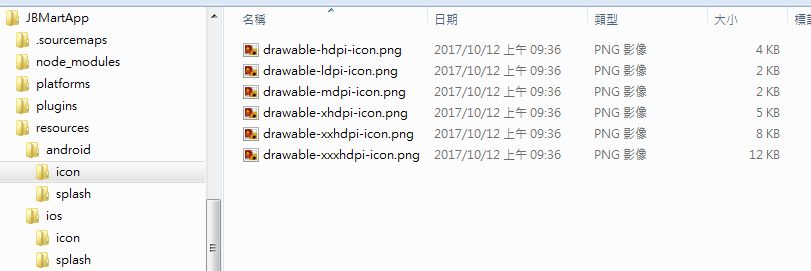
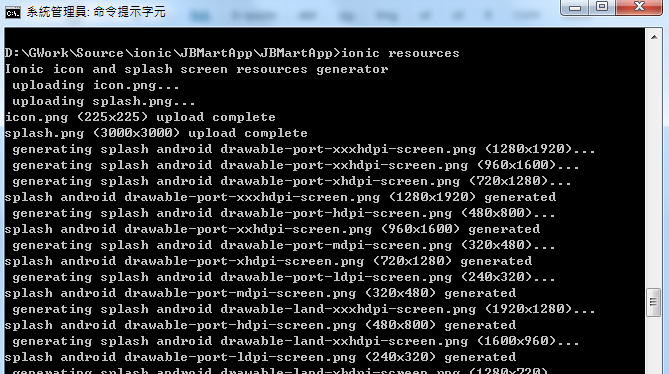
只需先於resources下 放置 icon.png 及 splash.png (像素請用2732 * 2048以上)
2

cd至專案目錄再執行ionic resources即會自動產生
1.PNG

註: 若未產生ios或android對應圖檔,
請記得於專案目錄先執行
ionic platform add ios 及 ionic platform add android

發表於 程式分享

ionic 2開發環境安裝及測試

一、安裝
1.node.js (http://nodejs.org)
安裝完後請node -v查看版本
2.安裝git (https://git-scm.com/downloads)
3.npm install -g cordova ionic
安裝完後請 cordova -v 及 ionic -v 查看版本
註 : 因我機器尚有安裝Visual Studio 2017,在查看cordova及ionic版本時竟失效,
發現是因與Visual Studio 的node.js衝突,
後來將Visual Studio的以下4個檔案複製至C:\Program Files\nodejs
(環境變數Path有設定此路徑)
(圖一) Visual Studio 安裝的路徑參考
1.PNG

(圖二) nodejs 安裝的路徑參考
2.PNG

二、建專案 (使用套件)
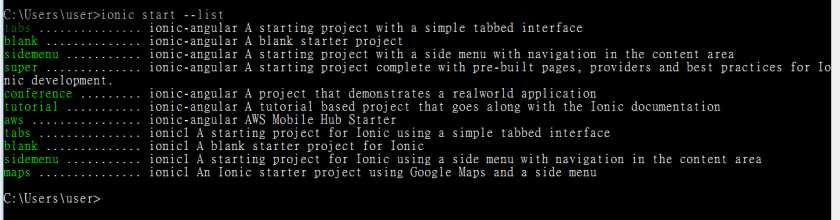
1.查看Template
ionic start –list
1.PNG

2.以Template建專案

ionic start projName super --ts
ionic start projName blank --ts
ionic start projName tabs --ts
ionic start projName base --ts
ionic start projName sidemenu --ts

3.執行專案
cd tempName
PS.projName請自行取專案名稱

ionic serve

4.ionic serve遇到的狀況及後續處理
1) Cannot find module ‘@angular/tsc-wrapped/src/tsc’
於專案路徑執行以下指令以加入TypeScript compiler 工具

npm install --save-dev @angular/tsc-wrapped

2) Runtime Error : Cannot find module “tslib"
處理方式 :

npm install tslib

3) Runtime Error : Cannot find module “localforage"
處理方式 :

npm install localforage

4) Runtime Error : Cannot find module “localforage-cordovasqlitedriver"
處理方式 :

npm install localforage-cordovasqlitedriver
發表於 程式分享

iTunes Connect通知外部人員測試 App- TestFlight初體驗

昨天做完iPhone/iPad開發實機測試及上架練習筆記
一直在等app mail通知可做外部人員測試,
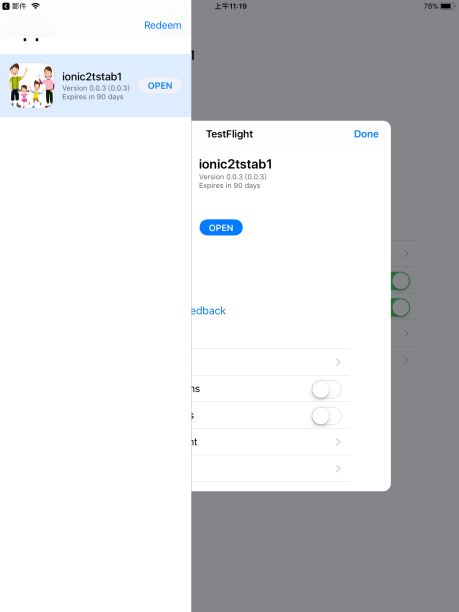
今天早上收到了
image4.jpeg

依通知的執行步驟

1.安裝TestFlight

2.開啟TestFlight並選取Redeem

3.輸入通知代碼出現

image6.jpeg

click INSTALL即會安裝app,安裝完後就可以開始測試了~

image7.png


發表於 程式分享

iPhone/iPad開發實機測試及上架練習筆記

前言:apple開發者帳號係年費,約台幣3,400元,去年申請後未再續,近日透過信用卡繳年費後,帳號一直處於Pending狀態,後來才發現有此封mail需上傳身份證明文件。
1.PNG

一、Xcode實機debug
1.USB連線
2.Xcode debug時直接選取此iPhone/iPad機器,build後即會將app安裝至實機上,即可操作

二、實機用ipa檔安裝
1.使用Xcode取得 iPhone/iPad 實機的機器序號
2.於開發者網頁設定devices
https://developer.apple.com/
=> 登入
=> Certificates, Identifiers & Profiles
=> Devices
=> All
3.Xcode Project設定
1) plist檔內的Automatic Signing請勾選,Team Id請選取有效之開發者帳號
2) 選取Release版本 : Product => Manage Schemes => Archive => Release
1.PNG

3) Build ipa檔:Product => Archive => Export… => 選取路徑儲存檔案後會有ipa檔 即可寄給相關測試人員
1.PNG

三、上架
1.https://itunesconnect.apple.com/
=> 我的App
=> 新的App
=> 其Bundle ID 需與 Xcode Project / plist的Bundle ID一致

2.Xcode上plist也需設定好1024 * 1024 market icon;版號也請每次上傳前要累加,否則上傳會失敗。

3.點選上圖的Upload to App Store…即可上傳至iTunesconnect,成功會出現如下訊息
1.PNG

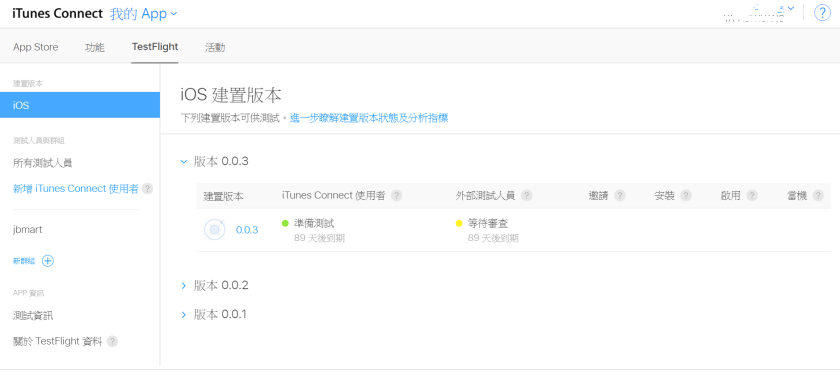
4.至https://itunesconnect.apple.com/
=> 我的App
=> TestFlight
=> 請編寫"測試資訊"

1.PNG

發表於 程式分享

visual studio 安裝 Ionic 2 templates

方法一:
1.至https://marketplace.visualstudio.com/items?itemName=VisualStudioPlatformTeam.Ionic2TemplatesforVisualStudio2017下載
Ionic 2 Templates for Visual Studio 2017 v1.0.vsix

2.直接執行 (請先關閉Visual Studio)

方法二:
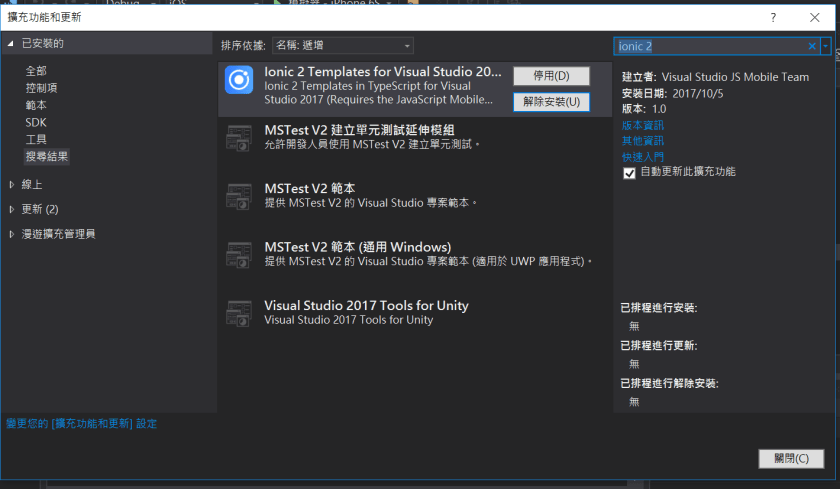
開啟Visual Studio / 工具 / 擴充功能和更新 / 搜尋輸入 ionic 2,直接進行安裝

1.PNG

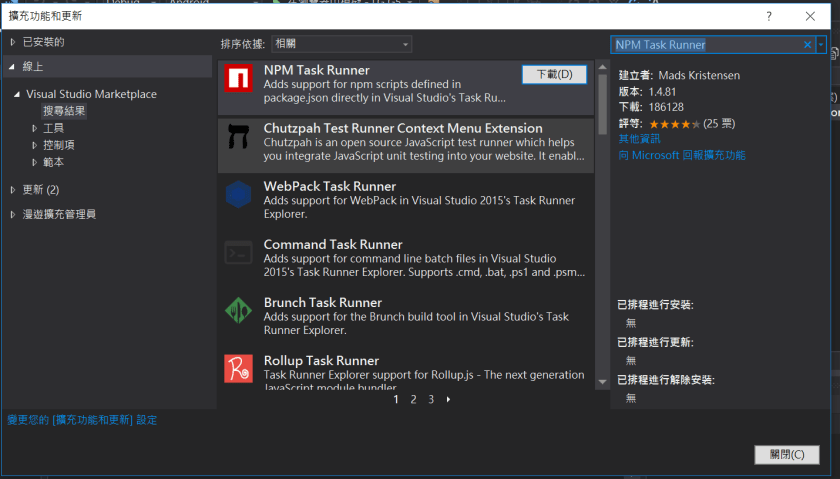
補充說明 : 還需裝NPM Task Runner

開啟Visual Studio / 工具 / 擴充功能和更新 / 搜尋輸入 NPM Task Runner,直接進行安裝

1

Ref.https://docs.microsoft.com/en-us/visualstudio/cross-platform/tools-for-cordova/first-steps/get-started-with-ionic2