因SEO建議動態網址需調整成靜態網址(不使用?後帶參數),
如此搜尋引擎才會區分為不同頁面。
為了將struts2原本的http://localhost/myweb/Index.action?blogId=30,
調整為http://localhost/myweb/blog30.action
PS.其中30為blog的字串,會變動
於struts.xml加入以下設定於<struts>…</struts>內

並於原本的action name為Index_*下再新增action name為blog{blogId}的設定,
預期以下3連結均能使用:
1.http://localhost/myweb/blog30.action
2.http://localhost/myweb/Index.action
3.http://localhost/myweb/Index_getJson.action


但設定後http://localhost/myweb/Index_getJson.action卻無法mapping至正確的action,
仔細研究constant的struts.patternMatcher之設定regex、namedVariable均可以設定為靜態網址,
而action name : Index_之對於mapping來說可能非變數,
看到網路有將*調整成{method},
經設定後變成http://localhost/myweb/Index.action無法使用;
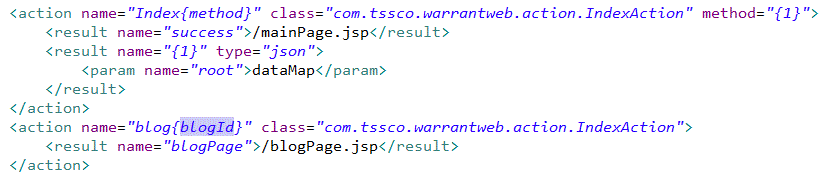
再調整action name : Index{method},
則可正確使用http://localhost/myweb/Index.action,
而http://localhost/myweb/Index_getJson.action就調整為http://localhost/myweb/IndexgetJson.action即可。
設定如下:




 葛麗絲的分享世界