發表於 程式分享

C#傳送FCM Notification Topics

1.FCMNotificationManager.cs


using System;
using System.Collections.Generic;
using System.IO;
using System.Linq;
using System.Net;
using System.Text;
using System.Web;
using System.Web.Script.Serialization;

   public class FCMNotificationManager
    {
        private NLog.Logger logger = NLog.LogManager.GetCurrentClassLogger();
        public FCMNotificationManager()
        {
        }

        public string SendNotification(string message, string title, long id)
        {
            string SERVER_API_KEY = "[請填入]";
            var SENDER_ID = "[請填入]";

            WebRequest tRequest;
            tRequest = WebRequest.Create("https://fcm.googleapis.com/fcm/send");
            tRequest.Method = "post";
            tRequest.ContentType = "application/json";
            tRequest.Headers.Add(string.Format("Authorization: key={0}", SERVER_API_KEY));
            tRequest.Headers.Add(string.Format("Sender: id={0}", SENDER_ID));

            string deviceId = "/topics/marketing";
            var data = new
            {
                to = deviceId,
                notification = new
                {
                    body = message,
                    title = title,
                    sound = "Enabled"

                }
            };
            var serializer = new JavaScriptSerializer();
            var json = serializer.Serialize(data);
            logger.Info("json: " + json);
            Byte[] byteArray = Encoding.UTF8.GetBytes(json);
            tRequest.ContentLength = byteArray.Length;

            Stream dataStream = tRequest.GetRequestStream();
            dataStream.Write(byteArray, 0, byteArray.Length);
            dataStream.Close();

            WebResponse tResponse = tRequest.GetResponse();
            dataStream = tResponse.GetResponseStream();
            StreamReader tReader = new StreamReader(dataStream);
            String sResponseFromServer = tReader.ReadToEnd();

            tReader.Close();
            dataStream.Close();
            tResponse.Close();
            return sResponseFromServer;
        }
    }

2.呼叫方式


FCMNotificationManager fcmNotificationMgr = new FCMNotificationManager();
string sResponseFromServer = fcmNotificationMgr.SendNotification("測試訊息...", "測試標題", 1);

3.SERVER_API_KEY 及 SENDER_ID
SERVER_API_KEY: 請填伺服器金鑰
SENDER_ID: 請填寄件者 ID
1

發表於 程式分享

ASP.Net新增NLog

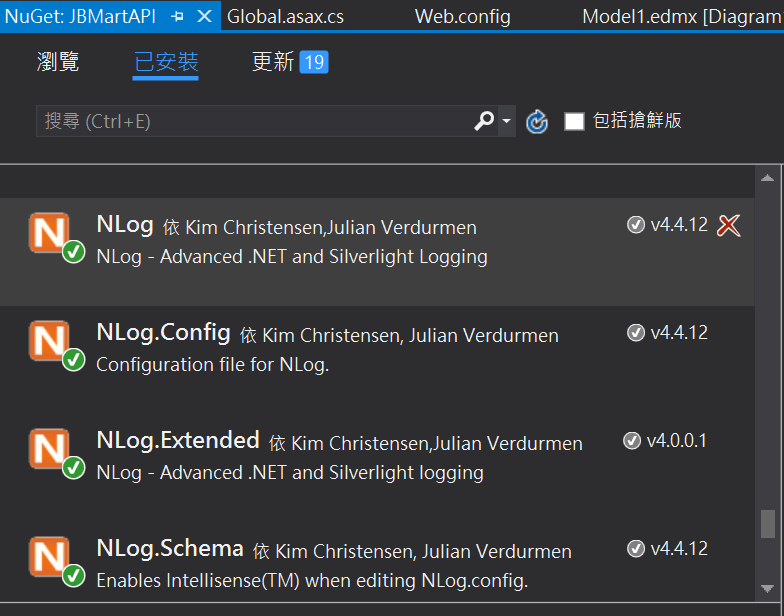
1.NuGet新增NLog套件: NLog, NLog.Config, NLog.Extended, NLog.Schema
1.PNG

2.於App_Data路徑下建立NLog.Errors路徑

3.設定NLog.config
1) targets element內新增


<target xsi:type="File" name="FiletoAppData"
            fileName="${basedir}/App_Data/NLog.Errors/${shortdate}.log"
            layout="${longdate} - ${uppercase:{level}} - ${message}"/>

2) rules element內新增


<logger name="*" minlevel="Trace" writeTo="FiletoAppData" />

4.程式內執行


logger.Info("This is a info info.");
logger.Debug("This is a debug info.");

5.程式執行後會產生檔案, Ex.2017-11-09.log

發表於 程式分享

ASP.Net C#新增排程

Global.asax.cs


using System;
using System.Collections.Generic;
using System.Diagnostics;
using System.IO;
using System.Linq;
using System.Web;
using System.Web.Caching;
using System.Web.Http;
using System.Web.Mvc;
using System.Web.Optimization;
using System.Web.Routing;
using System.Web.Security;
using System.Web.SessionState;

namespace JBMartAPI
{
    public class MvcApplication : System.Web.HttpApplication
    {
        private NLog.Logger logger = NLog.LogManager.GetCurrentClassLogger();
        private static CacheItemRemovedCallback OnCacheRemove = null;

        protected void Application_Start()
        {
            AreaRegistration.RegisterAllAreas();
            GlobalConfiguration.Configure(WebApiConfig.Register);
            FilterConfig.RegisterGlobalFilters(GlobalFilters.Filters);
            RouteConfig.RegisterRoutes(RouteTable.Routes);
            BundleConfig.RegisterBundles(BundleTable.Bundles);

            logger.Info("Start Task...");
            AddTask("Task A", 10);
            AddTask("Task B", 120);
        }
        
        private void AddTask(string name, int seconds)
        {
            OnCacheRemove = new CacheItemRemovedCallback(CacheItemRemoved);
            HttpRuntime.Cache.Insert(name, seconds, null,
                DateTime.UtcNow.AddSeconds(seconds), System.Web.Caching.Cache.NoSlidingExpiration,
                CacheItemPriority.NotRemovable, OnCacheRemove);
            //HttpRuntime.Cache.Insert(name, seconds, null, Cache.NoAbsoluteExpiration, TimeSpan.FromSeconds(seconds));
        }
        
        public void CacheItemRemoved(string key, object value, CacheItemRemovedReason reason)
        {
            //do something based on the key value
            switch (key)
            {
                case "Task A":
                    Debug.Print("Task A");
                    logger.Info("Task A");
                    break;
                case "Task B":
                    Debug.Print("Task B");
                    logger.Info("Task A");
                    break;
                default:
                    break;
            }
            //re-schedule the task cache item 
            AddTask(key, Convert.ToInt32(value));
        }
    }
}

Ref.參考http://www.steepvalley.net/background-tasks-in-asp-net-web-services-or-api/的實作。