今天為了將測試的網頁可以透過jquery的ajax讀取另一domain的json檔案(因為沒辦法直接讀本機的file://檔),
試了一陣子,chrome、fixfox可以了,但ie不行,ie OK了。
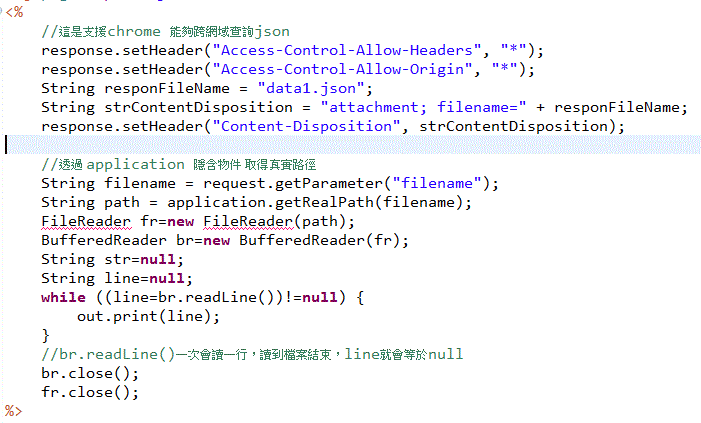
1.chrome、firfox是server用jsp讀取原始的json檔(這原本就是測試網站,故直接編寫json至一個檔案),
檔案內容如下
2.ie是加上jquery設定,須在執行getJSON前設定
$.support.cors = true;
今天為了將測試的網頁可以透過jquery的ajax讀取另一domain的json檔案(因為沒辦法直接讀本機的file://檔),
試了一陣子,chrome、fixfox可以了,但ie不行,ie OK了。
1.chrome、firfox是server用jsp讀取原始的json檔(這原本就是測試網站,故直接編寫json至一個檔案),
檔案內容如下
2.ie是加上jquery設定,須在執行getJSON前設定
$.support.cors = true;
狀況:新增CrystalReport報表至VS2010 WindowsApplication執行出現The type or namespace name ‘CrystalDecisions’ could not be found (are you missing a using directive or an assembly reference?),
但是CrystalReport1.cs已有宣告
using CrystalDecisions.Shared;
using CrystalDecisions.ReportSource;
using CrystalDecisions.CrystalReports.Engine;
而project的reference也有此3項dll。
解法:將project的properties ==> Application ==> Target framework ==> 由.Net Framework4 Client Profile 改為 .Net Framework4,
就可以complier及執行成功了~~
原因:尚不知解法之原因…

為了將一個xls檔案內的100多個sheet轉換成1個sheet,
以方便列印節省紙張,
試出來的方法~~
Sub 按鈕1_Click()
    On Error Resume Next
    Dim xlBook As Workbook
    Set xlBook = Workbooks.Open("欲轉換的來源檔.xls")

    Dim DestSh As Worksheet
    Set DestSh = ActiveWorkbook.Sheets(1)
    DestSh.Name = "匯總"

    Dim sheet As Worksheet
    Dim Last As Long
    Dim shLast As Long
    shLast = 1

    For Each sheet In xlBook.Worksheets
        Last = LastRow(sheet)
        Dim CopyRng As Range

        Set CopyRng = sheet.UsedRange

        If Last + shLast > DestSh.Rows.Count Then
            MsgBox "內容太多放不下啦!"
            Exit Sub
        End If

        CopyRng.Copy

        With DestSh.Cells(shLast + 1, 1)
            .PasteSpecial Paste:=xlPasteFormats
            '.PasteSpecial Paste:=xlPasteValues
            .PasteSpecial Paste:=xlPasteAll
            Application.CutCopyMode = xlCopy
        End With

        shLast = shLast + Last
    Next
    MsgBox "已合併完成"
End Sub

Function LastRow(sh As Worksheet)
    LastRow = sh.Cells.Find(what:="*", _
                            After:=sh.Range("A1"), _
                            Lookat:=xlPart, _
                            LookIn:=xlFormulas, _
                            SearchOrder:=xlByRows, _
                            SearchDirection:=xlPrevious, _
                            MatchCase:=False).Row
End Function

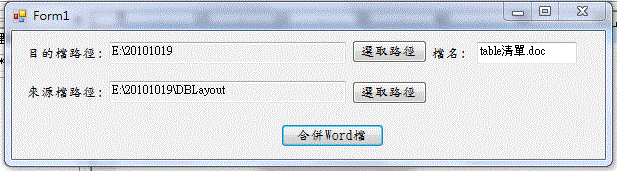
一、畫面如下:

二、程式碼
using System;
using System.Collections.Generic;
using System.ComponentModel;
using System.Data;
using System.Drawing;
using System.Text;
using System.Windows.Forms;
//以下為新加入
using System.Reflection;
using System.IO;
using Word = Microsoft.Office.Interop.Word; //VS2005沒有此行,VS2008要用此行
//加入參考==>COM==>Microsoft Office 12.0 Object Library,自動產生參考Word
namespace WordMerge
{
public partial class Form1 : Form
{
public Form1()
{
InitializeComponent();
}
private void MergeWord_Click(object sender, EventArgs e)
{
if (targetPath.Text.Trim().Length <= 0 || sourcePath.Text.Trim().Length <= 0 ||
targetFileName.Text.Trim().Length <= 0)
{
MessageBox.Show(“資料不完整!");
return;
}
Object missing = Missing.Value;
object oOutputDoc = targetPath.Text.Trim() + @"\" + targetFileName.Text.Trim();
Word.Application wordApp = new Word.Application();
Word._Document word = wordApp.Documents.Add(ref missing, ref missing, ref missing, ref missing);
object oPageBreak = Word.WdBreakType.wdPageBreak;
string[] files = Directory.GetFiles(sourcePath.Text.Trim());
for (int iIdx = 0; iIdx < files.Length; iIdx++)
{
wordApp.Selection.InsertFile(files[iIdx], ref missing, ref missing, ref missing, ref missing);
wordApp.Selection.InsertBreak(ref oPageBreak);
wordApp.ActiveDocument.SaveAs(ref oOutputDoc,
ref missing, ref missing, ref missing,
ref missing, ref missing, ref missing,
ref missing, ref missing, ref missing,
ref missing, ref missing, ref missing,
ref missing, ref missing, ref missing);
}
wordApp.Quit(ref missing, ref missing, ref missing);
MessageBox.Show(“合併完成!");
}
private void targetPathButton_Click(object sender, EventArgs e)
{
FolderBrowserDialog path = new FolderBrowserDialog();
path.ShowDialog();
this.targetPath.Text = path.SelectedPath;
}
private void sourcePathButton_Click(object sender, EventArgs e)
{
FolderBrowserDialog path = new FolderBrowserDialog();
path.ShowDialog();
this.sourcePath.Text = path.SelectedPath;
}
}
}


 葛麗絲的分享世界